
FunctionGemma is a powerful small language model that enables developers to ship fast and cost-effective agents that can translate natural language into actionable API calls, especially on edge devices. In the previous A Guide to Fine-Tuning FunctionGemma blog, our colleague shared some best practices for finetuning FunctionGemma using the Hugging Face TRL library on GPUs. In this post we are going to explore a different path by using Google Tunix to perform the finetuning on TPUs. You can find the complete notebook here.
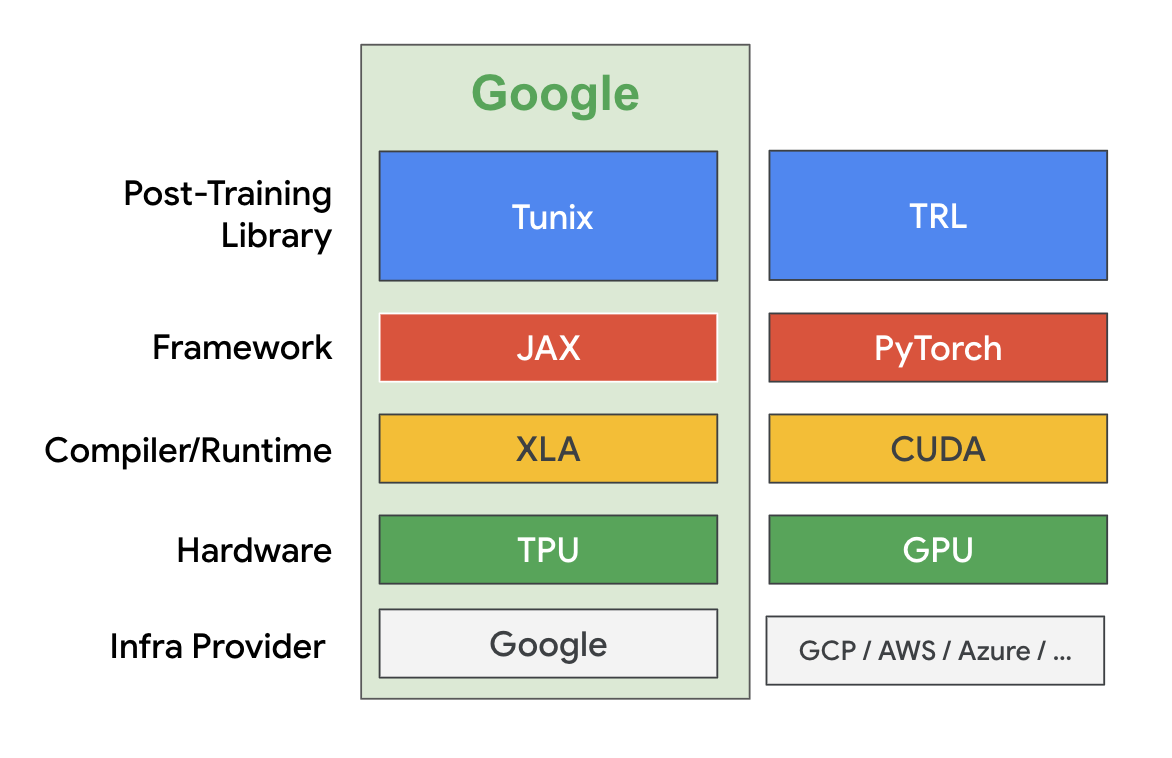
Tunix is a lightweight library implemented in JAX and designed to streamline the post-training of Large Language Models (LLMs) and it is part of the extended JAX AI Stack. Tunix supports a wide range of modern LLM post-training techniques such as supervised finetuning, Parameter-Efficient Fine-Tuning, preference tuning, reinforcement learning, and model distillation. Tunix works with the latest open models like Gemma, Qwen and LLama, and is designed to work on a large scale of hardware accelerators with high efficiency.
In this tutorial we are going to use LoRA to do supervised finetuning on FunctionGemma and run everything on free-tier Colab TPU v5e-1. We are using the same Mobile Action dataset as in the previous finetuning tutorial.
First, we download the FunctionGemma model weights and the dataset using Hugging Face Hub.
MODEL_ID = "google/functiongemma-270m-it"
DATASET_ID = "google/mobile-actions"
local_model_path = snapshot_download(repo_id=MODEL_ID, ignore_patterns=["*.pth"])
data_file = hf_hub_download(repo_id=DATASET_ID, filename="dataset.jsonl", repo_type="dataset")Tunix leverages JAX sharding schemes for parallelism under the hood. But since free-tier Colab only offers TPU v5e-1 (single core), we are creating a simple mesh without any sharding.
NUM_TPUS = len(jax.devices())
MESH = [(1, NUM_TPUS), ("fsdp", "tp")] if NUM_TPUS > 1 else [(1, 1), ("fsdp", "tp")]
mesh = jax.make_mesh(*MESH, axis_types=(jax.sharding.AxisType.Auto,) * len(MESH[0]))Tunix can directly load the model weights from safetensors via the create_model_from_safe_tensors() function. We then use Qwix to apply the LoRA adapters to the attention layers.
with mesh:
    base_model = params_safetensors_lib.create_model_from_safe_tensors(local_model_path, model_config, mesh)
    lora_provider = qwix.LoraProvider(
        module_path=".*q_einsum|.*kv_einsum|.*gate_proj|.*down_proj|.*up_proj",
        rank=LORA_RANK, alpha=LORA_ALPHA,
    )
    model_input = base_model.get_model_input()
    model = qwix.apply_lora_to_model(base_model, lora_provider, rngs=nnx.Rngs(0), **model_input)
    state = nnx.state(model)
    pspecs = nnx.get_partition_spec(state)
    sharded_state = jax.lax.with_sharding_constraint(state, pspecs)
nnx.update(model, sharded_state)To support the completion-only loss, we define a custom dataset class, which we will use to feed training data into Tunix.
class CustomDataset:
    def __init__(self, data, tokenizer, max_length=1024):
        self.data = data
        self.tokenizer = tokenizer
        self.max_length = max_length

    def __len__(self): return len(self.data)

    def __iter__(self):
        for item in self.data:
            template_inputs = json.loads(item['text'])
            prompt_and_completion = self.tokenizer.apply_chat_template(
                template_inputs['messages'], tools=template_inputs['tools'], tokenize=False, add_generation_prompt=False
            )
            prompt_only = self.tokenizer.apply_chat_template(
                template_inputs['messages'][:-1], tools=template_inputs['tools'], tokenize=False, add_generation_prompt=True
            )

            tokenized_full = self.tokenizer(prompt_and_completion, add_special_tokens=False)
            tokenized_prompt = self.tokenizer(prompt_only, add_special_tokens=False)

            full_ids = tokenized_full['input_ids']
            prompt_len = len(tokenized_prompt['input_ids'])

            if len(full_ids) > self.max_length:
                full_ids = full_ids[:self.max_length]

            input_tokens = np.full((self.max_length,), self.tokenizer.pad_token_id, dtype=np.int32)
            input_tokens[:len(full_ids)] = full_ids

            input_mask = np.zeros((self.max_length,), dtype=np.int32)
            if len(full_ids) > prompt_len:
                mask_end = min(len(full_ids), self.max_length)
                input_mask[prompt_len:mask_end] = 1

            yield peft_trainer.TrainingInput(
                input_tokens=jnp.array(input_tokens, dtype=jnp.int32),
                input_mask=jnp.array(input_mask, dtype=jnp.int32)
)Next we create the data generators using CustomDataset:
def data_generator(split_data, batch_size):
   dataset_obj = CustomDataset(split_data, tokenizer, MAX_LENGTH)
   batch_tokens, batch_masks = [], []
   for item in dataset_obj:
       batch_tokens.append(item.input_tokens)
       batch_masks.append(item.input_mask)
       if len(batch_tokens) == batch_size:
           yield peft_trainer.TrainingInput(input_tokens=jnp.array(np.stack(batch_tokens)), input_mask=jnp.array(np.stack(batch_masks)))
           batch_tokens, batch_masks = [], []


print("Preparing training data...")
train_batches = list(data_generator(train_data, BATCH_SIZE))
val_batches = list(data_generator(val_data_for_loss, BATCH_SIZE))Now we can kick off the finetuning:
print("Starting Training...")
max_steps = len(train_batches) * NUM_EPOCHS
lr_schedule = optax.cosine_decay_schedule(init_value=LEARNING_RATE, decay_steps=max_steps)
metrics_logging_options = metrics_logger.MetricsLoggerOptions(
    log_dir=os.path.join(OUTPUT_DIR, "logs"), flush_every_n_steps=10
)
training_config = peft_trainer.TrainingConfig(
    eval_every_n_steps=EVAL_EVERY_N_STEPS,
    max_steps=max_steps,
    checkpoint_root_directory=os.path.join(OUTPUT_DIR, "ckpts"),
    metrics_logging_options=metrics_logging_options,
)
trainer = peft_trainer.PeftTrainer(model, optax.adamw(lr_schedule), training_config).with_gen_model_input_fn(gen_model_input_fn)

with mesh:
    trainer.train(train_batches, val_batches)
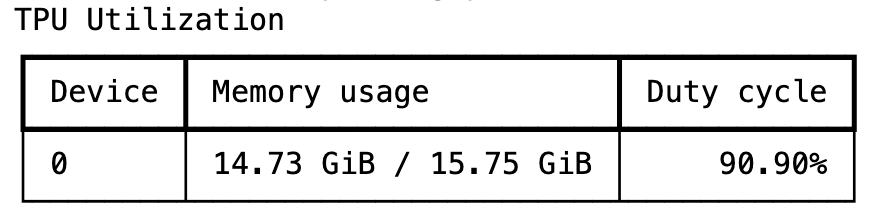
print("Training Complete.")The training takes a few minutes and Tunix is able to achieve a pretty high TPU utilization rate during the training.
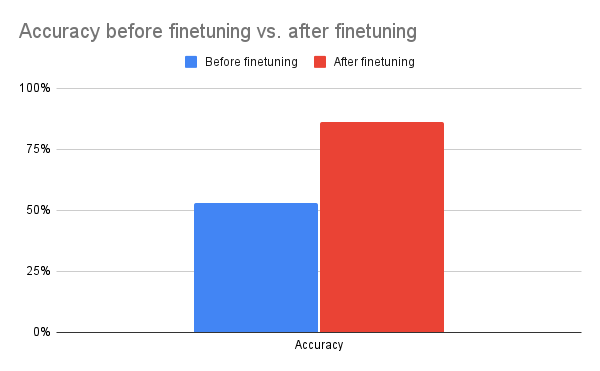
After one epoch of training, we can see a significant boost of accuracy. This demonstrates Tunix's ability to drive significant qualitative improvements with minimal training overhead.
When we are happy with the performance, we can merge the LoRA adapters and export the finetuned model back to safetensors for further downstream processing, such as on-device deployment with LiteRT.
merged_output_dir = os.path.join(OUTPUT_DIR, "merged")
print(f"Saving merged LoRA model to {merged_output_dir}")
gemma_params.save_lora_merged_model_as_safetensors(
    local_model_path=local_model_path,
    output_dir=merged_output_dir,
    lora_model=model,
    rank=LORA_RANK,
    alpha=LORA_ALPHA,
)
print("Model Exported Successfully.")That’s our whole workflow of finetuning FunctionGemma with Tunix. As you can see, Tunix is fairly straightforward to use and can leverage Google TPUs very efficiently. Of course, we are just scratching the surface of Tunix here since supervised finetuning is the simplest finetune approach and Tunix can do so much more (like reinforcement learning). We are actively working on adding more agentic training capabilities to Tunix.
Tunix bridges the gap between research prototypes and production-ready systems. Its modularity, JAX-native speed, and breadth of supported algorithms make it an essential tool for any developer looking to polish their LLMs for specific tasks. Please check out the Tunix documentation to learn more and follow the Tunix repository for more updates from us.

Introducing Wednesday Build Hour

Developer’s Guide to Building ADK Agents with Skills

Boost Training Goodput: How Continuous Checkpointing Optimizes Reliability in Orbax and MaxText

Bring state-of-the-art agentic skills to the edge with Gemma 4