
In the world of Agentic AI, the ability to call tools is what translates natural language into executable software actions. Last month, we released FunctionGemma, a specialized version of our Gemma 3 270M model explicitly fine-tuned for function calling. It is designed for developers building fast and cost-effective agents that translate natural language into executable API actions.
Specific applications often require specialist models. In this post, we demonstrate how to fine-tune FunctionGemma to handle tool selection ambiguity: when a model must choose between one or more seemingly similar functions to call. We also introduce the "FunctionGemma Tuning Lab", a demo tool that makes this process accessible without writing a single line of training code.
If FunctionGemma already supports tool calling, why is fine-tuning necessary?
The answer lies in context and policy. A generic model doesn't know your business rules. Common use cases for fine-tuning include:
Let's look at a practical example from the technical guide on fine-tuning FunctionGemma using the Hugging Face TRL library.
The goal was to train a model to distinguish between two specific tools:
search_knowledge_base (Internal documents)search_google (Public information)When asked "What are the best practices for writing a simple recursive function in Python?", a generic model defaults to Google. However, for a query like "What is the reimbursement limit for travel meals?", the model needs to know that this is an internal policy question.
To evaluate performance, we used the bebechien/SimpleToolCalling dataset, which contains sample conversations requiring a choice between two tools: search_knowledge_base and search_google.
This dataset is split into training and testing sets. We keep the test set separate so we can evaluate the model on "unseen" data, ensuring it learns the underlying routing logic rather than just memorizing specific examples.
When we evaluated the base FunctionGemma model using a 50/50 split between training and testing, the results were suboptimal. The base model chose the wrong tool or offered to "discuss" the policy rather than executing the function call.
When preparing your dataset, how you split your data is just as important as the data itself.
from datasets import load_dataset

dataset = load_dataset("bebechien/SimpleToolCalling", split="train")

# Convert dataset to conversational format
dataset = dataset.map(create_conversation, remove_columns=dataset.features, batched=False)

# Split dataset into 50% training samples and 50% test samples
dataset = dataset.train_test_split(test_size=0.5, shuffle=False)In this case study, the guide implemented a 50/50 train-test split with shuffling disabled (shuffle=False). While an 80/20 split is standard for production, this equal division was chosen specifically to highlight the model's performance improvement on a large volume of unseen data.
However, there is a trap here:
Disabling shuffling was intentional here as the dataset is shuffled already. But if your source data is sorted by category (e.g., all search_google examples appear first, followed by all search_knowledge_base examples), using shuffle=False will result in the model training entirely on one tool and being tested on the other. This lack of variety during the training phase leads to catastrophic performance as the model never learns to distinguish between different categories.
Best Practice:
When applying this to custom datasets, always ensure your source data is pre-mixed. If the distribution order is unknown, you must change the parameter to shuffle=True to ensure the model learns a balanced representation of all tools during training.
The model was fine-tuned using SFTTrainer (Supervised Fine-Tuning) for 8 epochs.The training data explicitly taught the model which queries belonged to which domain.
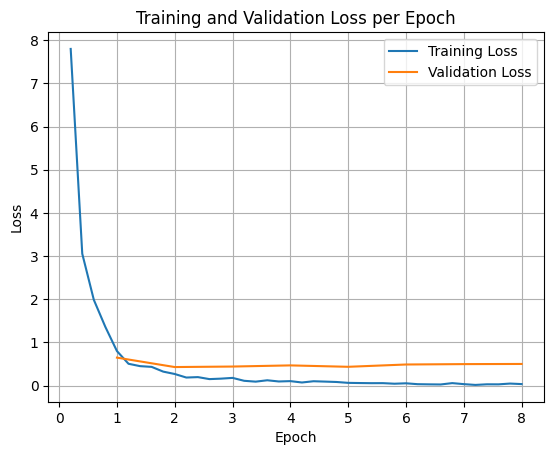
The graph above illustrates the "loss" (the error rate) decreasing over time. The sharp drop at the beginning indicates the model rapidly adapting to the new routing logic.
After fine-tuning, the model’s behavior changed dramatically. It learned to strictly adhere to the enterprise policy. When asked the same questions, such as "What is the process for creating a new Jira project?", the fine-tuned model correctly executed:
<start_function_call>call:search_knowledge_base{query:<escape>Jira project creation process<escape>}<end_function_call>Not everyone wants to manage Python dependencies, configure SFTConfig, or write training loops from scratch. Introducing the FunctionGemma Tuning Lab.
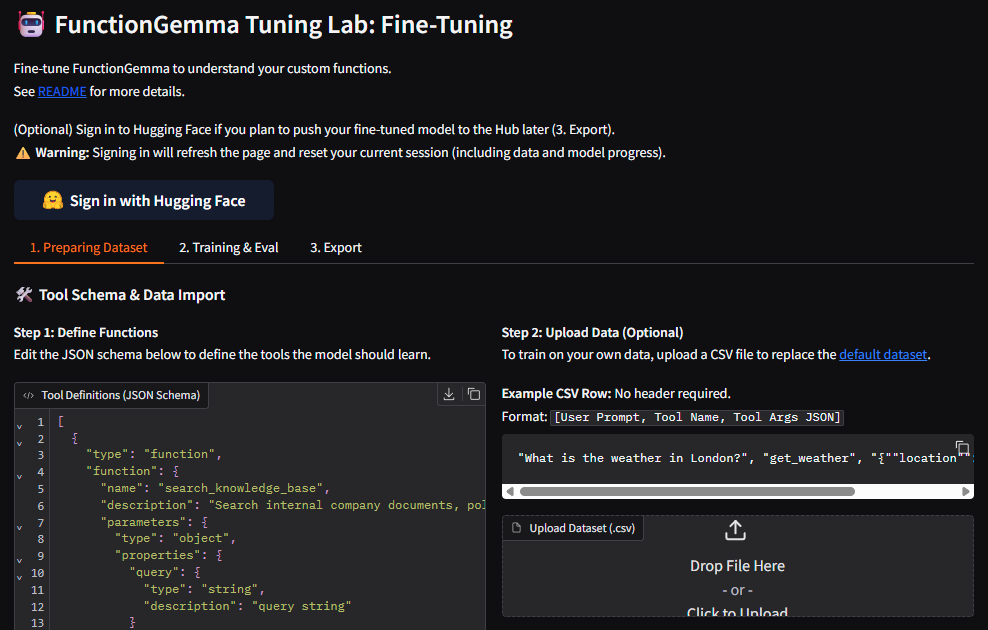
The FunctionGemma Tuning Lab is a user-friendly demo hosted on Hugging Face Spaces. It streamlines the entire process of teaching the model your specific function schemas.
To use the Tuning Lab locally, you can clone the repository with hf CLI and run the app with a few simple commands:
hf download google/functiongemma-tuning-lab --repo-type=space --local-dir=functiongemma-tuning-lab
cd functiongemma-tuning-lab
pip install -r requirements.txt
python app.pyWhether you choose to write your own training script using TRL or utilize the demo visual interface of the FunctionGemma Tuning Lab, fine-tuning is the key to unlocking the full potential of FunctionGemma. It transforms a generic assistant into a specialized agent capable of adhering to strict business logic and handling complex, proprietary data structures.
Thanks for reading!
Blog Post
Code Examples
HuggingFace Space

Introducing Wednesday Build Hour

Developer’s Guide to Building ADK Agents with Skills
Boost Training Goodput: How Continuous Checkpointing Optimizes Reliability in Orbax and MaxText
Bring state-of-the-art agentic skills to the edge with Gemma 4