Since we launched the Gemini CLI extensions framework in early October, we've seen an explosion of Google-owned and third-party-contributed extensions in the open-source ecosystem. Today, a new extension for Data Commons joins the list, making it easier than ever to access and understand the world’s publicly available data.
The Data Commons extension for Gemini CLI enables you to ask complex, data-driven, questions in natural language, directly querying Data Commons’ vast repository of public datasets to ground LLM responses in authoritative sources and reduce AI hallucinations.
Think of Data Commons as a massive, organized library for public data. It brings together billions of data points from sources like the United Nations, the World Bank, and various government agencies into a single knowledge graph based on the open-source Schema.org vocabulary.
The Data Commons extension for Gemini CLI utilizes the underlying Data Commons MCP tools, which are optimized for high-level, natural-language data interactions. The extension makes it even simpler – you can install and run the tools with a single command and immediately start running a full range of data-driven queries, from initial discovery to generative reports, right away.
Data Commons gives anyone interested in public statistical data easy access to hundreds of datasets distilled from authoritative public sources. The Data Commons agent and tools are optimized to engage in conversations with exploratory and analytical questions, such as:
Data exploration:
Data analysis and insights:
Data Commons data is pulled directly from authoritative public sources, thereby reducing hallucinations. You can compare Data Commons data results with results returned by other Gemini CLI tools, such as GoogleSearch.
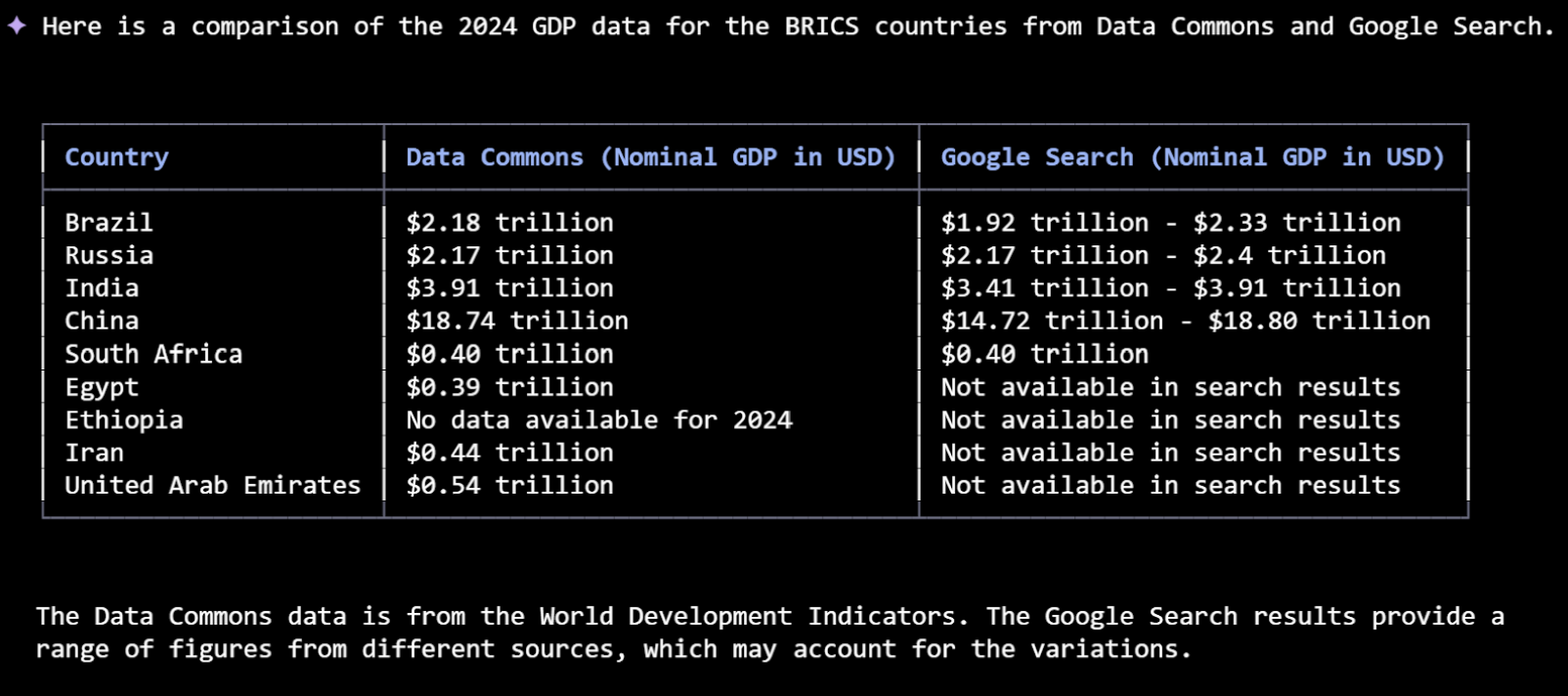
The Gemini CLI framework allows you to combine results from Data Commons with those from other data-related extensions into an integrated workflow.
For example, you could use MCP Toolbox for Databases to compare public data with your own proprietary datasets; or you could use Looker to create visualizations based on Data Commons results.
You can use Data Commons' standalone MCP server to build your own agents and applications.
To learn more, check out the Data Commons MCP server announcement or head over to https://docs.datacommons.org/mcp.