
End to end walkthrough of the new Agents CLI Extension System, with a worked LangChain example and a custom deploy policy
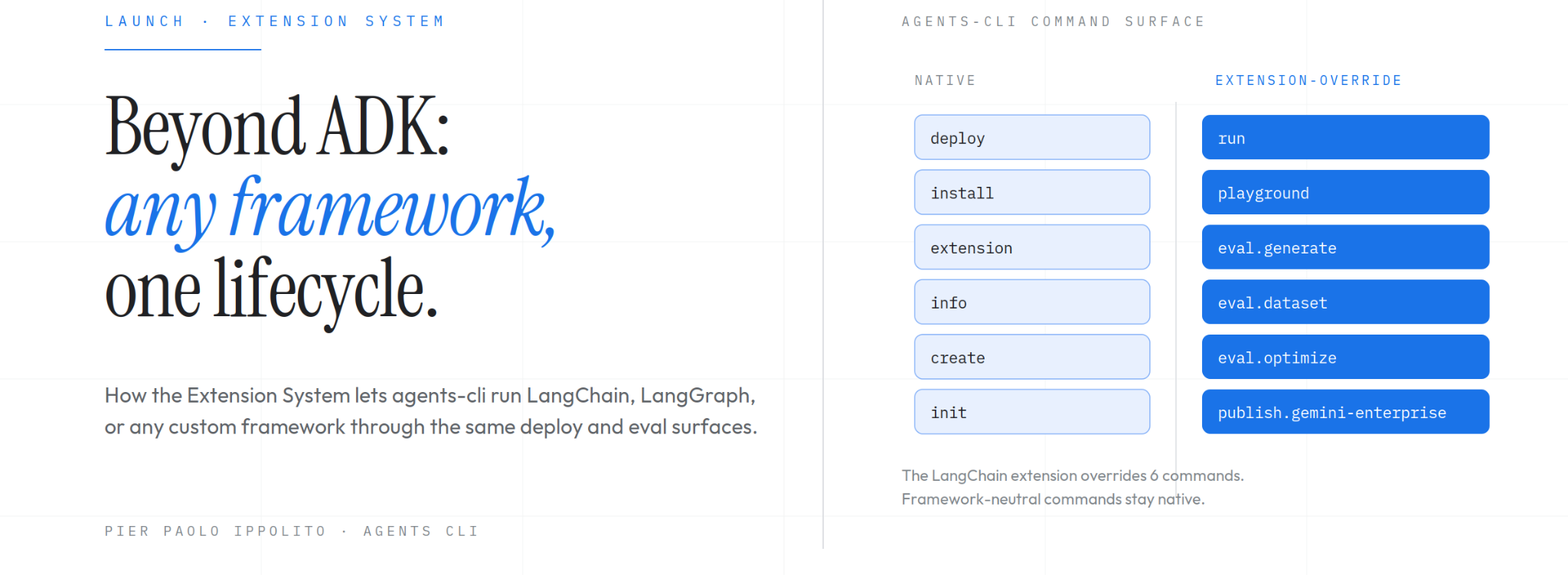
When we launched Agents CLI at Google Cloud Next '26, we built it around one strong opinion: going from an idea to a production agent on Google Cloud should take a single unified command surface. For teams building with Agent Development Kit (ADK), that opinionated path has worked. You run agents-cli create, write the agent logic, and ship to Cloud Run with observability and evals wired up, in about thirty minutes.
The agent framework landscape has grown more diverse in the months since. In addition to ADK, developers today pick between LangChain and LangGraph, specialized newcomers like Deep Agents, or in-house frameworks tailored to a specific business domain. Different teams prefer different frameworks, and the right choice for a greenfield prototype is rarely the right choice for a production migration. Enterprise admins may also have governance policies they want to enforce across the ADLC for all of their development teams, such as: a compliance scan, an SSO gate, a Model Risk Management hop.
Can a team benefit from the deployment, evaluation, and observability work in Agents CLI without being forced to adopt ADK, or without being forced to accept the default behavior of every command? Starting with version 1.5.0, the answer is yes. Agents CLI now ships with an Extension System that lets developers override or add commands without forking the tool. Version 1.8.0 ships the first-party LangChain extension, which replaces the framework-coupled commands with their LangChain equivalents and leaves the rest of the lifecycle untouched.
We will walk through two journeys below. First, to show you the ADLC with LangChain agents, we'll show you how you can scaffold, run, deploy, and evaluate a LangChain agent through the Agents CLI lifecycle using the first-party extension. Then we build our own small extension that wraps the deploy command with a Software Bill of Materials (SBOM) scan, demonstrating the pattern enterprise platform teams can use to enforce their own policies across every project. Both journeys use the same mechanism.
Most agent development toolchains available today share a limitation: they are opinionated about one specific framework, and the surrounding capabilities (deployment targets, CI/CD pipelines, evaluation harnesses, observability wiring) assume the developer has adopted that framework. When your framework matches the tool's assumption, the opinionated path works. When it does not, you're left with three bad options.
The first is to fork the CLI, maintaining a divergent copy and re-syncing it on every upstream release. You pay a permanent maintenance tax, and every upstream improvement has to be hand-merged into the fork. The second is to wrap the CLI behind custom scripts, building a parallel command surface that invokes the underlying tool. The problem is that developers (and their coding assistants) forget about the wrapper and call the underlying tool directly, bypassing the intended abstraction. The third is to walk away and build everything from scratch, which can consume several engineer-months of work that the team had not planned for, and which rarely produces tooling as polished as the upstream project.
The problem shows up in two scenarios. One is enterprise customers adopting Agents CLI: in regulated industries, a central platform team often requires that every deploy invocation be wrapped with a compliance check, that login route through corporate single sign-on, or that evaluations flow through a Model Risk Management pipeline. Each of these requirements, implemented today, means either forking the CLI or building a wrapper layer. The other is teams that use ADK most of the time but need to run a non-ADK framework on a specific project. Within the Agents CLI command surface, six commands assume the ADK runtime: playground, run, and four eval subcommands. The other eighteen or so (scaffold, infra, deploy, publish, login, and friends) are framework-agnostic. Without extensions, choosing a non-ADK framework for a single project meant losing access to all twenty-four.
The Extension System handles both with one mechanism.
An Agents CLI extension is a directory in a Git repository that contains a single file called agents-cli-extension.yaml. The file declares which built-in commands the extension overrides and which new commands it adds. From the official documentation:
Extensions are how you adapt agents-cli to a workflow it doesn't ship with — a different agent framework, an org's deploy policy, or a command of your own — without forking the tool.
Extensions take two shapes, described in the Using Extensions page. A command override replaces the behavior of a built-in like playground, deploy, or eval generate. The overridden command receives the user's arguments verbatim, so the user experience stays consistent with the native command. A new command exposes a workflow the CLI does not currently provide as agents-cli <your-command>. Both shapes can coexist in the same extension, and most non-trivial extensions use a combination of the two.
Extensions are distributed through Git repositories rather than through a dedicated package registry. The design draws from the extension model used by the gemini-cli project. There is no central index to publish to, no package format to maintain, and no ownership roster to apply for. Any directory inside any Git repository can serve as an extension, and Git handles the versioning, pinning, and distribution. For enterprise platform teams, this means creating an internal platform-extensions repository and pointing their developers at it, with no external registry to coordinate with.
An extension can be referenced in several ways, depending on where it lives and how the developer wants to use it:
# First-party shorthand, which resolves to the google/agents-cli repository
agents-cli extension add <name>

# Any organization or repository on GitHub, including self-hosted Git servers
agents-cli extension add acme/platform-extensions
agents-cli extension add acme/platform-extensions#soc2-deploy

# A local path, which is typically used during extension development
agents-cli extension add local@../my-extensionThe #<name> syntax lets a single Git repository hold multiple extensions, with the fragment identifier selecting one of them. Enterprise platform repositories often bundle together a family of related extensions (one for deploy, one for login, one for scaffold create) under a single repo with shared ownership and release cadence.
Extensions install at two scopes. The default is the project scope, where the extension and its lockfile entry are committed to the project's own repository. Teammates and CI pipelines pick it up on checkout. The alternative is the user scope, enabled via the --global flag, where the extension is stored in the user's home configuration directory and applies to every project on the machine. The user scope is the one you reach for when an extension needs to be available before any project exists, such as a framework bootstrap extension that configures agents-cli create itself.
When both scopes define the same command, the project scope wins, and agents-cli info surfaces the source of each active command. Scoping is deliberately explicit: the Extension System will not silently merge or override extensions, and any conflict surfaces to the developer at install time or in the extension list output.
The Extension System follows the discipline of package managers like uv or npm: it resolves a Git reference to an exact commit SHA at install time, records the resolved SHA in a lockfile, and uses the lockfile to re-materialize the exact reviewed code on every fresh checkout. The agents-cli install command restores the vendored working copy from the pinned SHA without advancing the pin, which guarantees that CI and local development run bit-for-bit identical code. To advance a pin to the latest commit on the tracked reference, the developer runs agents-cli extension update, which re-resolves the reference and re-prompts for third-party trust. The complete lifecycle is in the Using Extensions → Lifecycle section.
The Extension System is marked experimental in v1.8.0. The manifest schema and the command surface may still change in breaking ways before the system is finalized, so teams depending on it should pin their Agents CLI version.
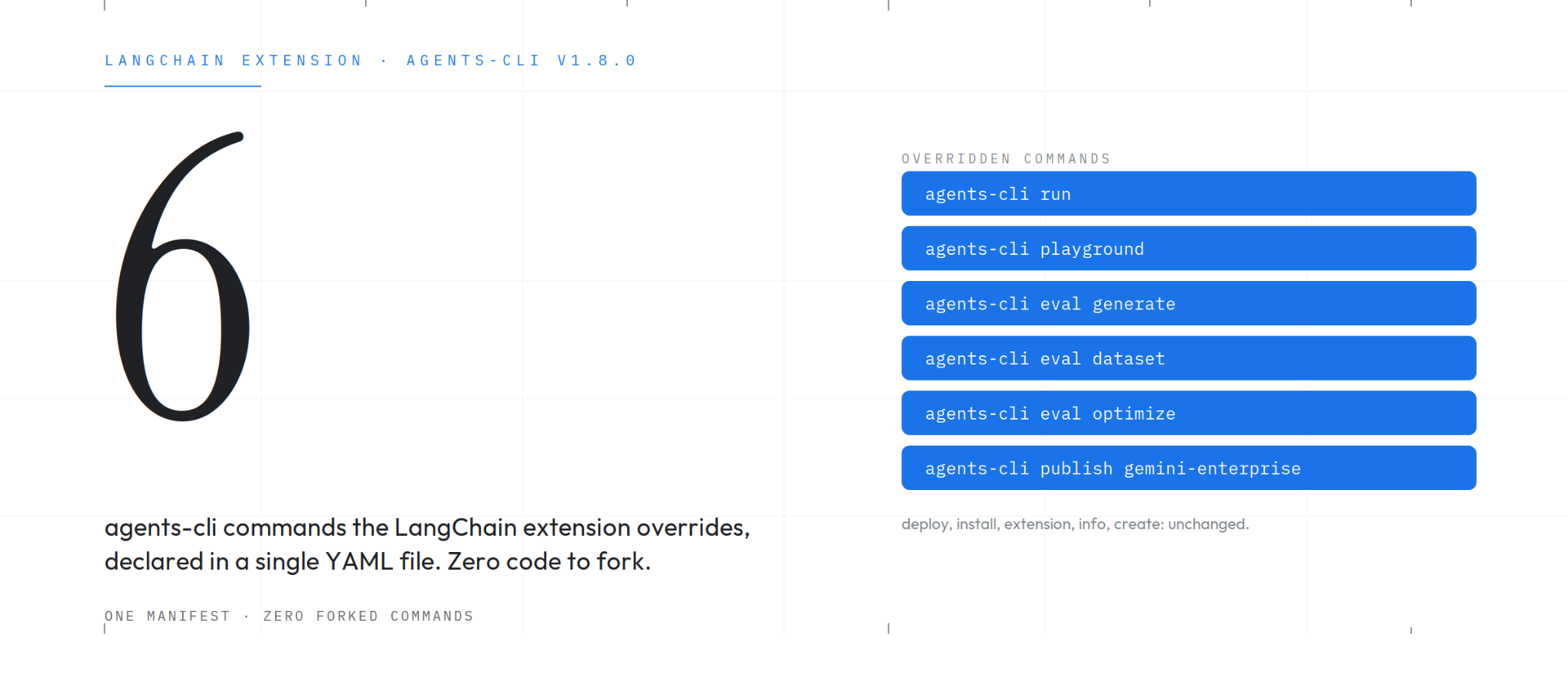
The LangChain first-party extension is a project template: one command scaffolds a working LangChain agent wired into the Agents CLI lifecycle. The resulting project has zero google-adk dependency and deploys to Cloud Run through the same code path an ADK project uses. The template's own description reads:
Run LangChain agents, LangGraph graphs, and Deep Agents through the agents-cli lifecycle.
In modern LangChain (version 1.0 and later), the state management layer is provided by LangGraph, so the three frameworks share a common graph representation. The template serves all three communities with the same code.
Before we begin, we need:
Python 3.11 or later
uv package manager
Google Cloud SDK (gcloud)A Google Cloud project with billing enabled is also required. If you do not have one yet, it can be created at console.cloud.google.com.
If Agents CLI is not already installed on the development machine, it can be installed in a single command:
uvx google-agents-cli setupFinally, we authenticate with Google Cloud and enable the APIs the agent will depend on at runtime:
gcloud auth application-default login
gcloud config set project YOUR_PROJECT_ID
gcloud services enable aiplatform.googleapis.com run.googleapis.com artifactregistry.googleapis.comScaffolding and extension installation are the same operation. Rather than installing an extension first and then scaffolding a project, we point agents-cli create directly at the extension's template, pinned to a specific release tag:
agents-cli create my-agent \
    --agent google/agents-cli/extensions/langchain/template@v1.8.0 \
    -d cloud_run

cd my-agent && agents-cli installThe output confirms the scaffold succeeded:
Agents CLI v1.8.0
Fetching remote template: google/agents-cli/extensions/langchain/template@v1.8.0
> Verifying GCP credentials...
> ✓ Connected to project: your-project
✅ Success! Your agent project is ready.The scaffolded project already contains an agents-cli-extension.yaml at its root, which is auto-loaded at project scope the next time any command is invoked. There is nothing to install manually, because the project itself is the extension's installation. A developer scaffolding a LangChain project does not need to know the Extension System exists. The command looks and feels like a native agents-cli create invocation that happens to produce a LangChain project instead of an ADK one.
Here's what the scaffolder produced:
my-agent/
├── agents-cli-extension.yaml      # auto-loaded project-scope overrides
├── agents-cli-manifest.yaml       # project configuration (deployment target, etc.)
├── GEMINI.md                      # project's coding-agent guide
├── langgraph.json                 # LangGraph dev-server configuration
├── pyproject.toml                 # langchain, langgraph, langchain-google-genai
├── Dockerfile                     # identical CMD to any ADK project
├── app/
│   ├── agent.py                   # exports root_agent: CompiledStateGraph
│   ├── fast_api_app.py            # exposes `app: FastAPI` on A2A
│   └── app_utils/
│       ├── a2a.py                 # LangGraphAgentExecutor and A2A routes
│       └── telemetry.py           # Cloud Trace and GenAI logging
├── scripts/
│   ├── run.py                     # drop-in replacement for `agents-cli run`
│   ├── eval_generate.py           # drop-in replacement for `agents-cli eval generate`
│   └── publish.py                 # Agent-Runtime-aware refusal wrapper
├── tests/
│   └── eval/datasets/basic-dataset.json
├── deployment/                    # Terraform infrastructure modules
├── uv.lock
└── .agents/skills/agents-cli-langchain/ # the project's own coding-agent skillThe structure looks similar to an ADK project: same app/, same tests/, same Terraform under deployment/, same manifest at the root. The two differences are the agents-cli-extension.yaml at the top (which carries the LangChain overrides) and the langgraph.json file (which configures the LangGraph dev server used by the local playground).
The main agent definition lives in app/agent.py:
"""LangChain agent: a Gemini ReAct agent with a sample tool."""

import os
from dotenv import load_dotenv
from langchain.agents import create_agent
from langchain_google_genai import ChatGoogleGenerativeAI
from langgraph.graph.state import CompiledStateGraph

load_dotenv()

if not (os.environ.get("GOOGLE_API_KEY") or os.environ.get("GEMINI_API_KEY")):
    import google.auth
    _, project_id = google.auth.default()
    os.environ["GOOGLE_CLOUD_PROJECT"] = project_id
    os.environ["GOOGLE_CLOUD_LOCATION"] = "global"
    os.environ["GOOGLE_GENAI_USE_VERTEXAI"] = "True"

LLM = "gemini-3.8-flash"
llm = ChatGoogleGenerativeAI(model=LLM, temperature=0)


def get_weather(query: str) -> str:
    """Simulates a web search. Use it get information on weather."""
    if "sf" in query.lower() or "san francisco" in query.lower():
        return "It's 60 degrees and foggy."
    return "It's 90 degrees and sunny."


root_agent: CompiledStateGraph = create_agent(
    model=llm, tools=[get_weather], system_prompt="You are a helpful assistant"
)The agent is created with the langchain.agents.create_agent helper, which compiles into a LangGraph CompiledStateGraph. The type annotation on root_agent makes this explicit. Modern LangChain uses LangGraph as its state management layer, which is why the template is positioned as supporting LangChain agents, LangGraph graphs, and Deep Agents through the same lifecycle: all three compile to the same underlying graph.
The scaffolded project contains no dependency on the Agent Development Kit. We can verify this directly:
$ grep -r "google.adk\|google-adk" pyproject.toml app/
$ echo "exit: $?"
exit: 1The grep returns no matches, and the exit code of 1 confirms the absence of ADK references. The google-* packages that do appear in pyproject.toml are the ones any Google Cloud Python project would include: google-cloud-aiplatform[evaluation], google-cloud-logging, langchain-google-genai, and the OpenTelemetry Google Cloud exporters.
agents-cli run "what's the weather in San Francisco?"The command produces:
WARNING:root:agents-cli: applying 6 extension command(s): eval.dataset [langchain/project], eval.generate [langchain/project], eval.optimize [langchain/project], playground [langchain/project], publish.gemini-enterprise [langchain/project], run [langchain/project]
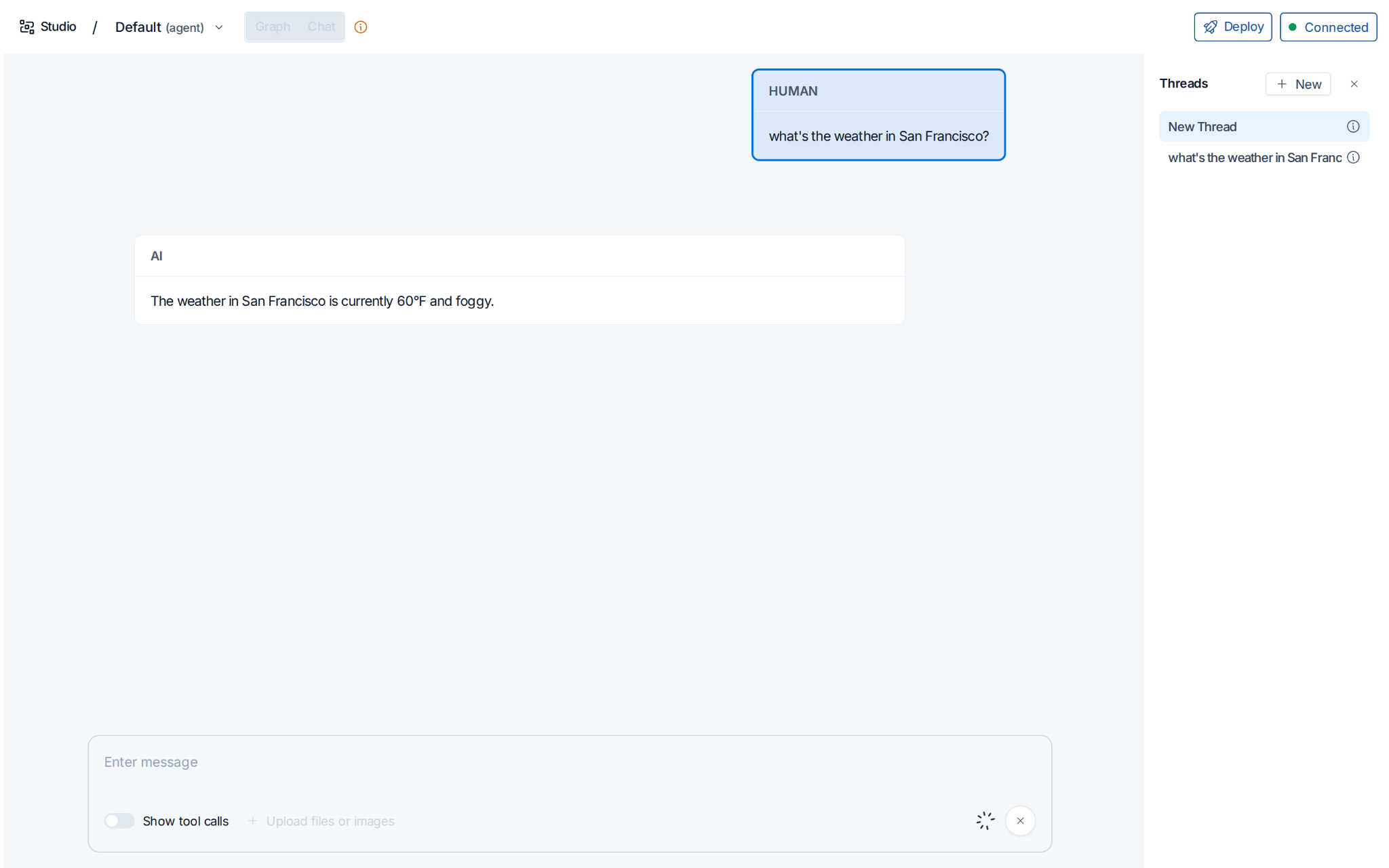
The weather in San Francisco is currently 60°F and foggy.Behind the scenes, Gemini-3.8-flash on Vertex AI has invoked the compiled graph in-process, called get_weather("San Francisco"), received the simulated foggy response, and reasoned the final sentence back to the user. The warning line tells us which extension commands are active, with one entry per overridden command. The warning is deliberate: an override quietly changes native behavior, so the loader always announces which commands are being intercepted and by whom.
For a local inspector, agents-cli playground boots LangGraph Studio on port 8080, replacing the ADK web UI that would otherwise appear.
To confirm which commands the extension has modified, we can inspect the help output:
$ agents-cli --help | grep -E "playground|run "
  playground      Start the local LangGraph dev server.  [↑ langchain]
run Run the compiled agent graph with a single prompt. [↑ langchain]The [↑ langchain] suffix is the Extension System's way of signalling that a command has been overridden, together with the name of the extension responsible. Both human developers and coding assistants reading the terminal can tell at a glance which commands behave differently in this project.
For a complete inventory, agents-cli info lists every active extension together with the exact command vector it executes:
Extensions (experimental):
  eval.dataset  (override, project) <- langchain: uv run python scripts/unsupported.py eval dataset
  eval.generate  (override, project) <- langchain: uv run python scripts/eval_generate.py
  eval.optimize  (override, project) <- langchain: uv run python scripts/unsupported.py eval optimize
  playground  (override, project) <- langchain: uv run langgraph dev --no-browser --port 8080
  publish.gemini-enterprise  (override, project) <- langchain: uv run --with pyyaml python scripts/publish.py
run (override, project) <- langchain: uv run python scripts/run.pySix overrides total, falling into three categories: four framework-coupled replacements (playground, run, eval.generate, and publish.gemini-enterprise), two explicit refusals (eval.dataset and eval.optimize need an ADK agent object to introspect, so the LangChain project refuses them cleanly rather than producing invalid results), and the publish.gemini-enterprise override additionally refuses only on the Agent Runtime deployment target while delegating to the native command on Cloud Run and GKE. The First-party frameworks page has the official breakdown.
The deploy command is not overridden by the LangChain extension. Deploying a LangChain project to Cloud Run uses exactly the same code path as deploying an ADK project:
agents-cli deployThe underlying mechanism shells out to gcloud run deploy --source . against the project's Dockerfile, which includes:
CMD ["uv", "run", "uvicorn", "app.fast_api_app:app", "--host", "0.0.0.0", "--port", "8080"]That CMD is identical to the one in an ADK project's Dockerfile. The LangChain template serves A2A (Agent-to-Agent) protocol traffic over FastAPI, exposing the application under app.fast_api_app:app. The deployment path does not need to know which framework is powering the agent, because uvicorn and gcloud run deploy operate on the FastAPI contract.
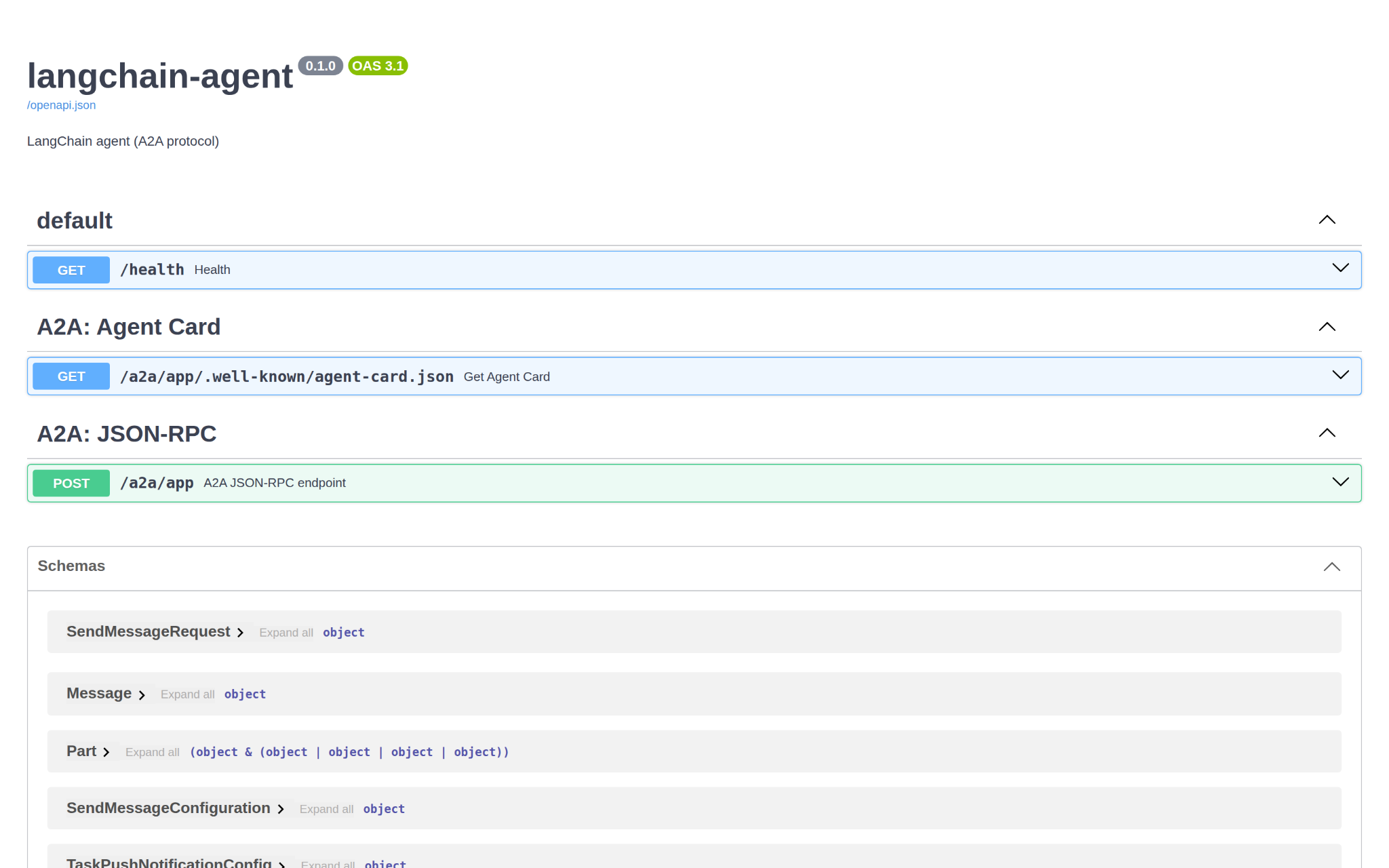
The same holds for infra, scaffold enhance, scaffold upgrade, install, info, setup, lint, and login. All unchanged in a LangChain project. A year of Agents CLI work on these commands lands in LangChain projects for free, with no divergence to maintain between the ADK and LangChain code paths.
Evaluations in a LangChain project follow the familiar pattern from the ADK walkthrough, with one difference: the eval generate step is overridden to drive the LangChain graph, while the subsequent evaluation steps use the native commands:
agents-cli eval generate --dataset tests/eval/datasets/basic-dataset.json \
    -o tests/eval/output/
agents-cli eval grade --traces tests/eval/output/basic-dataset.json \
    --config tests/eval/eval_config.yaml
agents-cli eval compare tests/eval/output/run_1.json tests/eval/output/run_2.jsonThe overridden eval generate command produces output in the standard EvaluationDataset format, which the native eval grade, eval compare, and eval analyze commands know how to consume. The evaluation service and the grading rubrics are framework-agnostic.
If a developer invokes one of the refused eval subcommands, the extension responds with a clear explanation rather than failing silently:
$ agents-cli eval dataset synthesize
agents-cli eval dataset is not supported by the langchain extension:
it runs the agent through ADK's user simulator, which needs google-adk
in this project's venv.A clear refusal is more useful than a silent failure, especially when a coding assistant is driving the terminal and would otherwise retry a broken command multiple times before giving up.
The LangChain template is the first-party demonstration of the Extension System, but the same mechanism is open to any team that wants to customize the Agents CLI command surface. Enterprise platform teams can author and distribute extensions internally, encoding their policies as code and shipping them through the Git infrastructure they already use for everything else. Every developer on the team then follows the same checks by default.
To illustrate the pattern, we will build a small extension called sbom-deploy that wraps the deploy command with a Software Bill of Materials (SBOM) scan, refusing to deploy if any critical vulnerabilities are found. The authoritative reference for the manifest schema is the Authoring Extensions page.
We begin by creating a directory for our extension and adding the manifest file at its root:
# agents-cli-extension.yaml
# yaml-language-server: $schema=https://raw.githubusercontent.com/google/agents-cli/main/schemas/agents-cli-extension-v1alpha1.schema.json

schema: agents-cli-extension/v1alpha1
name: sbom-deploy
description: Scan the project SBOM, then run the native agents-cli deploy.
requires:
  agents_cli: ">=1.5,<2"
  on_incompatible: warn

commands:
  override:
    deploy:
      run: ["bash", "scripts/sbom_then_deploy.sh"]
      description: SBOM scan via syft+grype, then the built-in deploy.
  add:
    sbom-report:
      run: ["bash", "scripts/sbom_report.sh"]
description: Produce an SBOM for the current project (no deploy).The manifest contains five top-level keys, and no others are allowed. The schema uses strict validation, so a typo like reqires: fails install with a did-you-mean suggestion rather than silently dropping the override.
The schema field identifies the manifest schema version. The name field is a single path component (slashes and parent-directory references are rejected) and becomes the directory under extensions/ where the vendored copy is stored. The requires block declares which versions of Agents CLI the extension supports, together with a policy (warn or error) that controls behavior on a version mismatch. The commands block is where the actual overrides and additions live.
The Rules that matter section of the authoring docs enumerates additional constraints worth knowing about. Two in particular: you can override a specific subcommand (such as eval.generate) but not a top-level command group (such as eval as a whole), and run: is a command vector, not a shell command, so any chaining of commands has to happen inside a wrapper script rather than inside the manifest.
Because run: is a command vector executed without a shell, chaining multiple operations means writing a wrapper script that sequences them explicitly:
#!/usr/bin/env bash
# scripts/sbom_then_deploy.sh
set -euo pipefail
cd "$(dirname "$0")/.."

echo "[sbom-deploy] generating SBOM..."
syft dir:. -o cyclonedx-json > /tmp/sbom.cdx.json

echo "[sbom-deploy] scanning for criticals..."
grype sbom:/tmp/sbom.cdx.json --fail-on critical

# AGENTS_CLI_DISABLE_OVERRIDES=1 is already set by the loader,
# so this call hits the built-in deploy. No infinite recursion.
echo "[sbom-deploy] SBOM clean; running native deploy..."
exec agents-cli deploy "$@"AGENTS_CLI_DISABLE_OVERRIDES=1 is what makes this work. Agents CLI sets it in the environment of any script invoked through an override. When our wrapper calls agents-cli deploy recursively, the call lands in the native deploy command rather than looping back to our own override. No special syntax, no recursion.
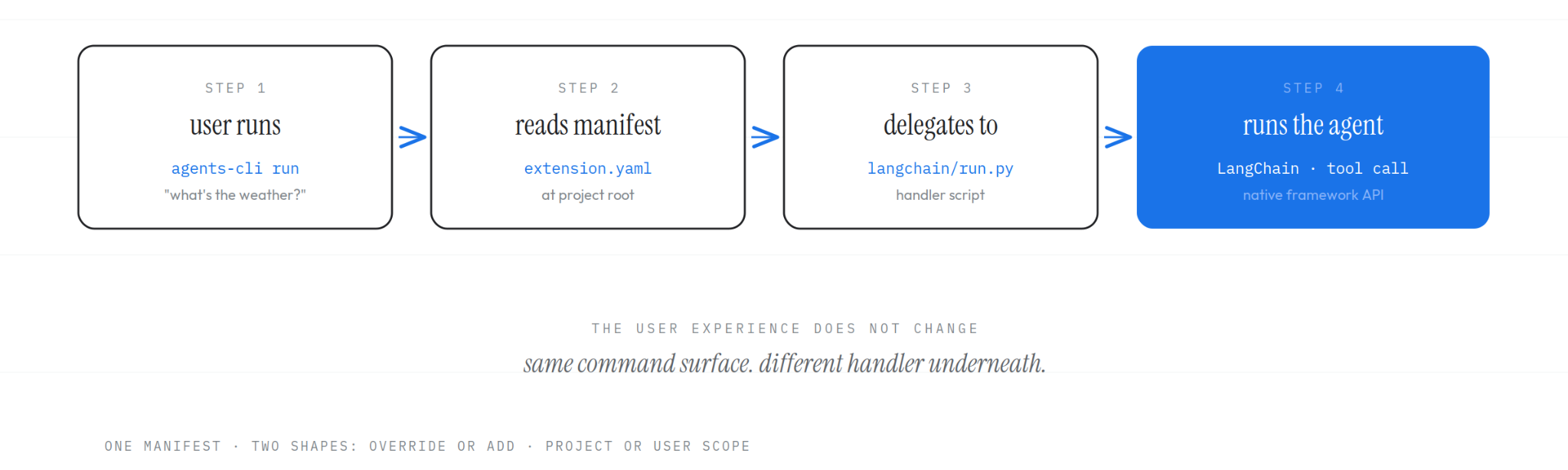
We can verify this directly. For demonstration, we swap the SBOM scan for a few echo statements that confirm the environment and arguments:
$ agents-cli deploy --project foo
[sbom-deploy] (demo) would scan SBOM here...
[sbom-deploy] AGENTS_CLI_DISABLE_OVERRIDES=1
[sbom-deploy] would then shell to: agents-cli deploy --project fooThe --project foo flag passed through to the wrapper verbatim, and the environment variable was set by the loader before our script began executing. The wrapper has everything it needs to delegate to the native command.
With the manifest and wrapper in place, we can install the extension. During development, point at the local path:
agents-cli extension add local@../my-sbom-extensionOnce the extension has been pushed to a Git repository, the same syntax works with a remote reference:
agents-cli extension add acme/platform-extensions#sbom-deploy --ref v1.0.0After installation, we verify the extension is active by listing the installed extensions and inspecting the help output:
$ agents-cli extension list
Extensions:
  langchain    project  (commands: eval.dataset, eval.generate, eval.optimize, playground, publish.gemini-enterprise, run)
  sbom-deploy  project  (commands: deploy, sbom-report)  requires: >=1.5,<2

$ agents-cli --help | grep -A1 -E "deploy|sbom-report"
  deploy          SBOM scan via syft+grype, then the built-in deploy.  [↑
                  sbom-deploy]
  sbom-report     Produce an SBOM for the current project (no deploy).  [↑
                  sbom-deploy]

$ agents-cli deploy --help
Usage: agents-cli deploy [OPTIONS] [EXTRA_ARGS]...

  Overrides `deploy` via extension 'sbom-deploy' (project scope).

  SBOM scan via syft+grype, then the built-in deploy.

  Runs: bash scripts/sbom_then_deploy.sh

  Argv after the command name passes through to the script verbatim.

  To bypass extension overrides and run the built-in:
AGENTS_CLI_DISABLE_OVERRIDES=1 agents-cli deployThe [↑ sbom-deploy] tag next to each overridden command is the Extension System's user-facing signal that the behavior has been modified.
Behind the scenes, extension add resolved our Git reference to an exact commit SHA and recorded the resolution in a lockfile at the project root:
# agents-cli-extensions.yaml  (lockfile; commit this to version control)
extensions:
- name: sbom-deploy
  source: acme/platform-extensions#sbom-deploy
  ref: v1.0.0
  sha: a1b2c3d4...
scope: projectBoth the lockfile and the vendored working copy under extensions/ should be committed. On a fresh checkout, agents-cli install re-materializes the exact reviewed code from the pinned SHA, the way uv sync or npm install restore pinned dependencies. The install command never advances the pin, so an extension cannot change its behavior between two deployments of the same commit.
To advance the pin to the latest commit on the tracked reference (branch, tag, or SHA), the developer runs agents-cli extension update sbom-deploy. To switch to a different tag or branch, re-run agents-cli extension add with a new --ref. The complete lifecycle is detailed in the Using Extensions → Lifecycle section.
Agents CLI began life as an opinionated path to shipping ADK agents on Google Cloud. With the Extension System in place, those opinions are now yours to override, replace, or augment.
Install Agents CLI and scaffold a LangChain agent in two commands:
uvx google-agents-cli setup
agents-cli create my-agent --agent google/agents-cli/extensions/langchain/template@v1.8.0 -d cloud_runThen explore the official documentation: the Extensions overview, Using extensions, Authoring extensions, and First-party extensions. The full source code of Agents CLI, including the first-party templates, is at github.com/google/agents-cli.
EmbeddingGemma 2: The Developer Guide

Integrating TorchTPU into TorchTitan and Optimizing Models for TPU

Bringing Visual Graph Debugging to Custom Edge Compilers with Model Explorer

Accelerating Spatio-Temporal Attention for Video Diffusion on TPUs