
Over the past month, Gemini 4 Argon and Gemini 4 Carbon brought frontier physical reasoning to robotics: understanding 3D scenes, reconstructing real environments in simulation, practicing tasks in sim before running them on hardware, and directly controlling robot arms from camera images. Last week, we introduced Gemini 4 Hydrogen, which brings strong spatial and embodied reasoning to a much faster model built for speed and efficiency.
To help developers put Hydrogen to work, today we're launching the Robotics plugin on Google Antigravity: a set of skills for hardware onboarding, simulation and robot control turning Antigravity into a one-stop robotics workbench. Together, they enable a developer to go from a robot in a box to one that can perform a working application in an afternoon. To install the plugin, open Antigravity, go to Customizations and search for Robotics on the Build With Google shelf.
Gemini 4 Argon and Carbon showed that a general model can drive a robot arm directly, and Gemini 4 Hydrogen preserves that ability. Give it a goal in plain language and a camera view, and it plans the task, writes and runs the control code, and keeps adjusting until the job is done. On the Artificial Analysis Robotics 0.1 benchmark, Gemini 4 Hydrogen controls a real 6-axis arm through eight everyday tabletop tasks, from pouring a drink to packing blocks into a box. Hydrogen scores 58, similar to Argon at a lower cost per token.
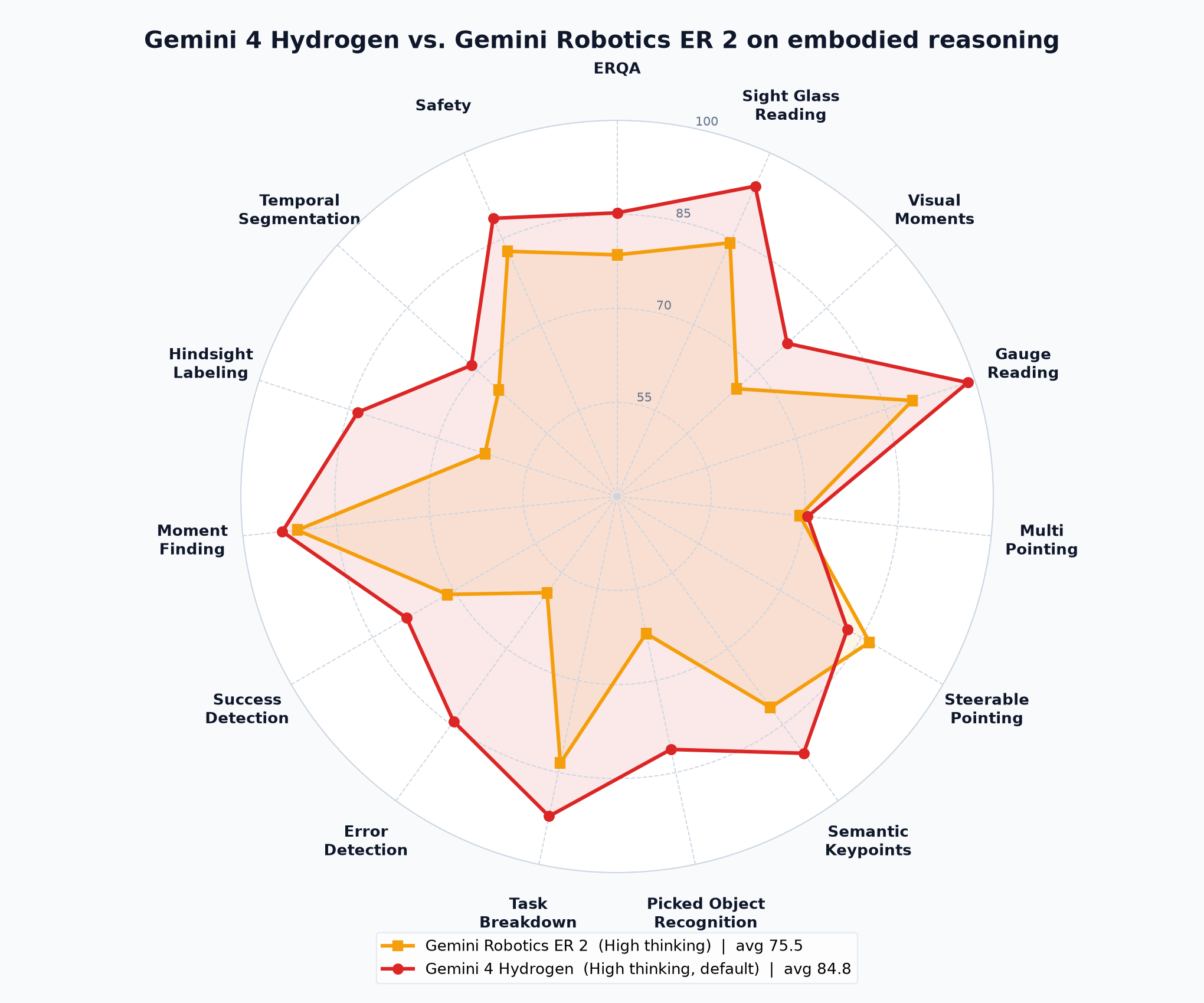
Hydrogen brings the specialized skills of our Gemini Robotics ER 2 (Embodied Reasoning) models into the core Gemini 4 model series, and it beats them on nearly every axis. On the public ERQA benchmark, Hydrogen outperforms Gemini Robotics ER 2 on spatial reasoning tasks such as multi-view correspondence and 3D trajectory reasoning. For developers using Gemini Robotics ER 2 today, we recommend trying out Gemini 4 Hydrogen for these workloads.
A fast, capable model is only half the story. Building a robot application has always meant gluing together drivers, calibration scripts, simulators, perception code, and a UI, which requires robotics expertise and a lot of time. The new Robotics plugin for Google Antigravity packages that work into skills Gemini can use on your behalf:
Here's what that looks like end to end: set up a robot and build real applications.
Starting from an empty desk, a developer plugs an I2RT YAM arm and an external depth camera into a laptop and asks Hydrogen in Antigravity to bring it up. The plugin's Skills install the software, find the camera, calibrate the arm, and run test motions. The arm is calibrated and ready for tasks in about 10 minutes. A similar flow also brings up a low-cost SO-ARM101 arm and an industrial grade FR3 Duo from scratch to live waving.
Once the robot is live, you can use a simple prompt to create a basic task within just a few minutes:
Once the robot is live, the next step is building a simulation you can trust. With the Robotics plugin, MuJoCo runs directly inside Antigravity with dedicated creation, auditing, and rendering skills. This allows you to build and preview high-quality simulated scenes and assets—whether described, imported from links/documents, or uploaded via workspace photos—right alongside your code. You can then "vibe sim" by adjusting shapes, positions, and physical properties through chat to verify reaching and grasping before deploying to physical hardware.
The workbench with Hydrogen and Robotics plugins lets you go from an idea to a repeatable working application in real world in a much shorter time, by iterating and validating it in simulation.
A developer starts with a whiteboard sketch: a conveyor belt carrying mixed snacks, with a robot arm picking and sorting them into bins. From one prompt of the task with images of a real scene, Hydrogen constructs an interactive MuJoCo simulation of the cell, testing and validating the grasping policy in sim across multiple runs. The developer then deploys the verified policy directly to the robot in the real world. When nuances emerge (such as tuning gripper closure force or refining sorting rules), the developer iterates in natural language, asking Hydrogen to adjust the controller to iterate. Within about an hour end-to-end, the arm reliably sorts snacks off the moving belt.
Hydrogen's efficiency makes it practical to run a multi-step robot application all day. In this example, a developer uses Hydrogen to build a small web storefront for a soap shop, then connects it to two YAM Pro arms. When an order comes in, the arms set out a packing bin, pick the ordered mint and citrus bars, and pull a printed thank-you note from a printer.
With just a few prompts, the FR3 Duo simulates a chess board and then can play chess against itself or take on human opponents.
Gemini 4 Argon pushes the ceiling of physical reasoning. Gemini 4 Hydrogen makes those capabilities fast and affordable enough to use every day, and the Antigravity Robotics plugin puts them in a workbench where anyone can go from a robot in a box to a working application. We can't wait to see what you build.
You can share your own creations and use cases on the plugin’s GitHub discussions page. If you have any ideas, custom skills, or derived work you think would be helpful, please let us know—we’ll keep improving the plugins.
gemini-4-hydrogen) in Google Antigravity and install the Robotics plugin: go to Customizations and search for Robotics on the Build With Google shelf. Then try a prompt: "Bring up my SO-101 arm and make it wave." Google Antigravity is for paid Google AI Pro or Ultra subscribers.gemini-4-hydrogen in the Interactions API, with day-one support in the google-genai SDKs.