

The Universal Commerce Protocol (UCP) is an open-source standard designed to power the next generation of agentic commerce. By establishing a common language and functional primitives, UCP enables seamless commerce journeys between consumer surfaces, businesses, and payment providers. It is built to work with existing retail infrastructure, and is compatible with Agent Payments Protocol (AP2) to provide secure agentic payments support. It also provides businesses flexible ways to integrate via APIs, Agent2Agent (A2A), and the Model Context Protocol (MCP).
UCP is developed by Google in collaboration with industry leaders including Shopify, Etsy, Wayfair, Target, and Walmart endorsed by over 20 global partners across the ecosystem like Adyen, American Express, Best Buy, Flipkart, Macy's Inc, Mastercard, Stripe, The Home Depot, Visa, Zalando and many more.
As consumers embrace conversational experiences, they expect seamless transitions from brainstorming and research to final purchase. That means it’s critical to support real-time inventory checks, dynamic pricing, and instant transactions, all within the user’s current conversational context.
However, traditional tech infrastructure makes it difficult to support this agentic shift. Businesses face an N x N integration bottleneck, forcing them to build bespoke connections for every surface, which ultimately slows the ecosystem's shift toward delightful agentic commercial experiences.
Developed in collaboration with industry leaders, UCP is designed to tackle this bottleneck and meet the evolving needs of the entire commerce landscape. Unlike legacy systems, UCP standardizes the full commerce journey - from discovery and consideration to purchase and order management - through a single, secure abstraction layer:
By reducing integration complexity and removing technical barriers, UCP enables businesses to actively participate in the new era of agentic commerce.
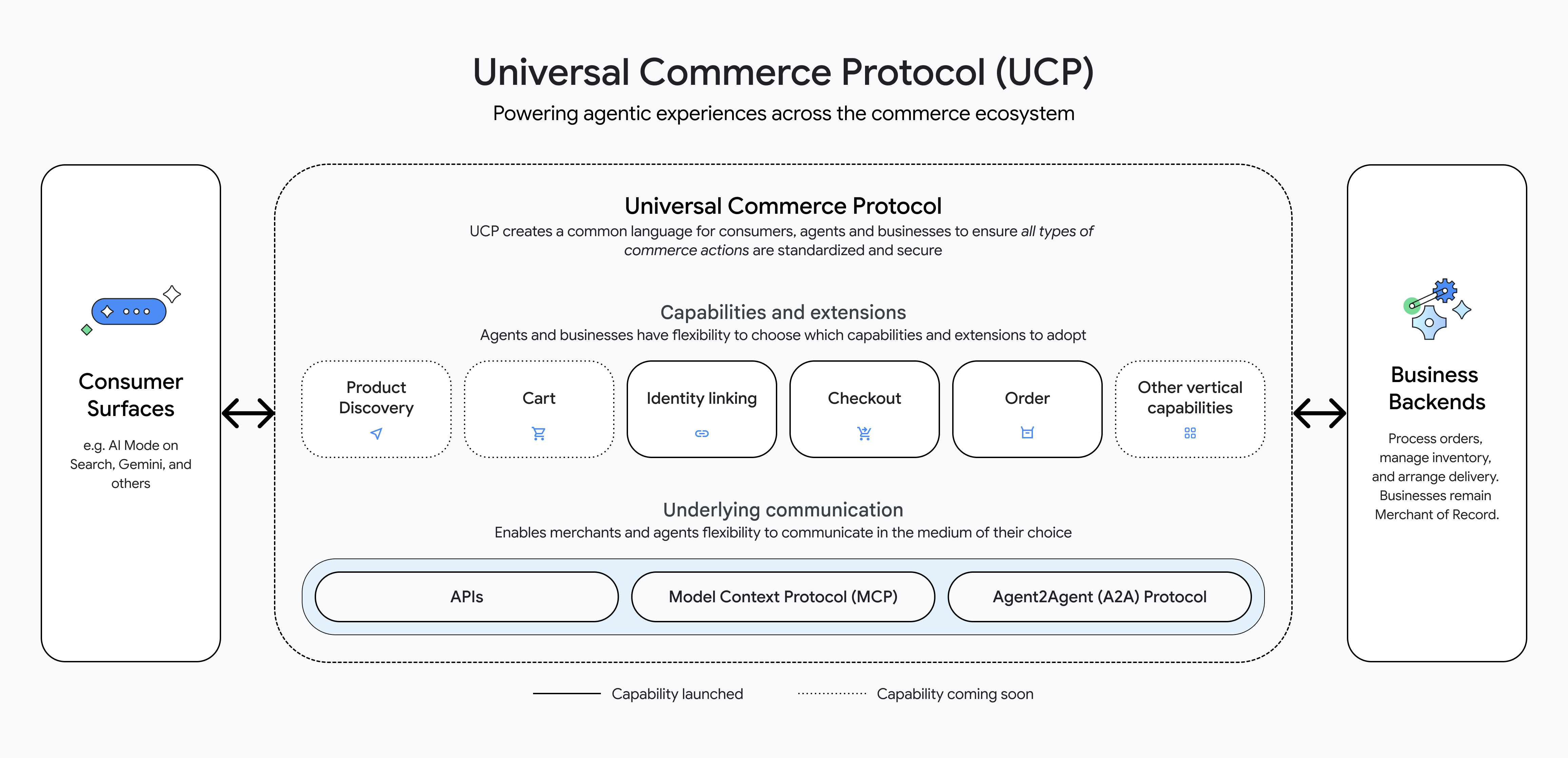
UCP is built to power agentic experiences across the commerce ecosystem. It creates a clear language for consumer surfaces (such as AI Mode on Search, Gemini, and others) to connect to business backends (for product discovery, cart checkout etc) in a standardized and secure way.
Businesses and agents choose the services (for example, Shopping and other verticals) they want to support, and expose the capabilities corresponding to them. Capabilities are core commerce building blocks such as checkout and product discovery. These capabilities can also have extensions that augment these capabilities with specialized functionality, such as discounts. UCP’s discovery mechanism allows agents to dynamically discover business capabilities and payment options via profiles.
Additionally, UCP models a unique payments architecture, separating what consumers use to pay (instruments) from payment handlers (payment processors) allowing it to scale to a diverse set of existing payment providers. UCP also supports multiple transports including A2A, MCP and APIs to provide flexibility for businesses and agents to communicate. For example, the Checkout Capability can have a REST API binding or a MCP binding depending on your platform's needs.
Let’s use a sample business store and an agent to see how UCP works.
Here are suggested steps:
To set up a business server, we have created a Samples repository, which contains the Python server to host the Business APIs and a UCP SDK which contains sample product data.
Set up the business server:
mkdir sdk
git clone https://github.com/Universal-Commerce-Protocol/python-sdk.git sdk/python
pushd sdk/python
uv sync
popd
git clone https://github.com/Universal-Commerce-Protocol/samples.git
cd samples/rest/python/server
uv syncThe business we are using is a demo flower shop. We have a SQLite based sample product database that allows us to store sample products for our demo.
Run the following command to create a local database populated with sample products for the business:
mkdir /tmp/ucp_test
uv run import_csv.py \
    --products_db_path=/tmp/ucp_test/products.db \
    --transactions_db_path=/tmp/ucp_test/transactions.db \
--data_dir=../test_data/flower_shopStart the business server hosting the Business APIs on port 8182, pointing to the sample products database. We start the server in the background and keep it running, so that the client can connect to it.
Run the following command to start the business server:
uv run server.py \
   --products_db_path=/tmp/ucp_test/products.db \
   --transactions_db_path=/tmp/ucp_test/transactions.db \
   --port=8182 &
SERVER_PID=$!Businesses publish the services they support and corresponding capabilities in a standard JSON manifest located at /.well-known/ucp. This allows agents to dynamically discover features, endpoints, and payment configurations without hard-coded integrations.
Run this command for your agent to discover business services and capabilities:
export SERVER_URL=http://localhost:8182
export RESPONSE=$(curl -s -X GET $SERVER_URL/.well-known/ucp)
echo $RESPONSEResponse:
{
"ucp": {
"version": "2026-01-11",
"services": { "dev.ucp.shopping": { "version": "2026-01-11", "spec": "https://ucp.dev/specs/shopping", "rest": { "schema": "https://ucp.dev/services/shopping/openapi.json", "endpoint": "http://localhost:8182/" } } },
"capabilities": [
{ "name": "dev.ucp.shopping.checkout", "version": "2026-01-11", "spec": "https://ucp.dev/specs/shopping/checkout", "schema": "https://ucp.dev/schemas/shopping/checkout.json" },
{ "name": "dev.ucp.shopping.discount", "version": "2026-01-11", "spec": "https://ucp.dev/specs/shopping/discount", "schema": "https://ucp.dev/schemas/shopping/discount.json", "extends": "dev.ucp.shopping.checkout" },
{ "name": "dev.ucp.shopping.fulfillment", "version": "2026-01-11", "spec": "https://ucp.dev/specs/shopping/fulfillment", "schema": "https://ucp.dev/schemas/shopping/fulfillment.json", "extends": "dev.ucp.shopping.checkout" }
]
},
"payment": {
"handlers": [
{ "id": "shop_pay", "name": "com.shopify.shop_pay", "version": "2026-01-11", "spec": "https://shopify.dev/ucp/handlers/shop_pay", "config_schema": "https://shopify.dev/ucp/handlers/shop_pay/config.json", "instrument_schemas": [ "https://shopify.dev/ucp/handlers/shop_pay/instrument.json" ], "config": { "shop_id": "d124d01c-3386-4c58-bc58-671b705e19ff" } },
{ "id": "google_pay", "name": "google.pay", "version": "2026-01-11", "spec": "https://example.com/spec", "config_schema": "https://example.com/schema", "instrument_schemas": [ "https://ucp.dev/schemas/shopping/types/gpay_card_payment_instrument.json"
], "config": { "api_version": 2, "api_version_minor": 0, "merchant_info": { "merchant_name": "Flower Shop", "merchant_id": "TEST", "merchant_origin": "localhost" }, "allowed_payment_methods": [ { "type": "CARD", "parameters": { "allowedAuthMethods": [ "PAN_ONLY", "CRYPTOGRAM_3DS" ], "allowedCardNetworks": [ "VISA", "MASTERCARD" ] }, "tokenization_specification": [ { "type": "PAYMENT_GATEWAY", "parameters": [ { "gateway": "example", "gatewayMerchantId": "exampleGatewayMerchantId" } ] } ] } ] } },
{ "id": "mock_payment_handler", "name": "dev.ucp.mock_payment", "version": "2026-01-11", "spec": "https://ucp.dev/specs/mock", "config_schema": "https://ucp.dev/schemas/mock.json", "instrument_schemas": [ "https://ucp.dev/schemas/shopping/types/card_payment_instrument.json" ], "config": { "supported_tokens": [ "success_token", "fail_token" ] } }
]
}
}Full response example.
Run this command for your agent to create a checkout session with the sample products:
export RESPONSE=$(curl -s -X POST "$SERVER_URL/checkout-sessions" -H 'Content-Type: application/json' -H 'UCP-Agent: profile="https://agent.example/profile"' -H 'request-signature: test' -H 'idempotency-key: 0b50cc6b-19b2-42cd-afee-6a98e71eea87' -H 'request-id: 6d08ae4b-e7ea-44f4-846f-d7381919d4f2' -d '{"line_items":[{"item":{"id":"bouquet_roses","title":"Red Rose"},"quantity":1}],"buyer":{"full_name":"John Doe","email":"john.doe@example.com"},"currency":"USD","payment":{"instruments":[],"handlers":[{"id":"shop_pay","name":"com.shopify.shop_pay","version":"2026-01-11","spec":"https://shopify.dev/ucp/handlers/shop_pay","config_schema":"https://shopify.dev/ucp/handlers/shop_pay/config.json","instrument_schemas":["https://shopify.dev/ucp/handlers/shop_pay/instrument.json"],"config":{"shop_id":"d124d01c-3386-4c58-bc58-671b705e19ff"}},{"id":"google_pay","name":"google.pay","version":"2026-01-11","spec":"https://example.com/spec","config_schema":"https://example.com/schema","instrument_schemas":["https://ucp.dev/schemas/shopping/types/gpay_card_payment_instrument.json"],"config":{"api_version":2,"api_version_minor":0,"merchant_info":{"merchant_name":"Flower Shop","merchant_id":"TEST","merchant_origin":"localhost"},"allowed_payment_methods":[{"type":"CARD","parameters":{"allowedAuthMethods":["PAN_ONLY","CRYPTOGRAM_3DS"],"allowedCardNetworks":["VISA","MASTERCARD"]},"tokenization_specification":[{"type":"PAYMENT_GATEWAY","parameters":[{"gateway":"example","gatewayMerchantId":"exampleGatewayMerchantId"}]}]}]}},{"id":"mock_payment_handler","name":"dev.ucp.mock_payment","version":"2026-01-11","spec":"https://ucp.dev/specs/mock","config_schema":"https://ucp.dev/schemas/mock.json","instrument_schemas":["https://ucp.dev/schemas/shopping/types/card_payment_instrument.json"],"config":{"supported_tokens":["success_token","fail_token"]}}]}}') && echo $RESPONSEFull request example.
After creating the checkout session, your agent will receive a checkout id from the server, which can be used for more updates to the checkout session:
RESPONSE:

{
  "ucp": { "version": "2026-01-11", "capabilities": [ { "name": "dev.ucp.shopping.checkout", "version": "2026-01-11" } ] },
  "id": "cb9c0fc5-3e81-427c-ae54-83578294daf3",
  "line_items": [ {
      "id": "2e86d63a-a6b8-4b4d-8f41-559f4c6991ea",
      "item": { "id": "bouquet_roses", "title": "Bouquet of Red Roses", "price": 3500 },
      "quantity": 1,
      "totals": [ { "type": "subtotal", "amount": 3500 }, { "type": "total", "amount": 3500 } ]
    } ],
  "buyer": { "full_name": "John Doe", "email": "john.doe@example.com" },
  "status": "ready_for_complete",
  "currency": "USD",
  "totals": [ { "type": "subtotal", "amount": 3500 }, { "type": "total", "amount": 3500 } ],
  "links": [],
  "payment": { "handlers": [], "instruments": [] },
  "discounts": {}
}Full response example.
Run this command to enable your agent to apply discounts to the checkout session, using the checkout id from the previous step:
export CHECKOUT_ID=$(echo $RESPONSE | jq -r '.id') && export LINE_ITEM_1_ID=$(echo $RESPONSE | jq -r '.line_items[0].id') && export RESPONSE=$(curl -s -X PUT "$SERVER_URL/checkout-sessions/$CHECKOUT_ID" -H 'Content-Type: application/json' -H 'UCP-Agent: profile="https://agent.example/profile"' -H 'request-signature: test' -H 'idempotency-key: b9ecd4b3-0d23-4842-8535-0d55e76e2bad' -H 'request-id: 28e70993-e328-4071-91de-91644dc75221' -d "{\"id\":\"$CHECKOUT_ID\",\"line_items\":[{\"id\":\"$LINE_ITEM_1_ID\",\"item\":{\"id\":\"bouquet_roses\",\"title\":\"Red Rose\"},\"quantity\":1}],\"currency\":\"USD\",\"payment\":{\"instruments\":[],\"handlers\":[]},\"discounts\":{\"codes\":[\"10OFF\"]}}") && echo $RESPONSE | jqFull request example.
Your agent will receive the following response with the discount applied:
RESPONSE:

{
  "ucp": { "version": "2026-01-11", "capabilities": [ { "name": "dev.ucp.shopping.checkout", "version": "2026-01-11" } ] },
  "id": "cb9c0fc5-3e81-427c-ae54-83578294daf3",
  "line_items": [ {
      "id": "2e86d63a-a6b8-4b4d-8f41-559f4c6991ea",
      "item": { "id": "bouquet_roses", "title": "Bouquet of Red Roses", "price": 3500 },
      "quantity": 1,
      "totals": [ { "type": "subtotal", "amount": 3500 }, { "type": "total", "amount": 3500 } ] } ],
  "buyer": { "full_name": "John Doe", "email": "john.doe@example.com" },
  "status": "ready_for_complete",
  "currency": "USD",
  "totals": [ { "type": "subtotal", "amount": 3500 }, { "type": "discount", "amount": 350 }, { "type": "total", "amount": 3150 } ],
  "links": [],
  "payment": { "handlers": [], "instruments": [] },
  "discounts": {
    "codes": [ "10OFF" ],
    "applied": [ { "code": "10OFF", "title": "10% Off", "amount": 350, "automatic": false, "allocations": [ { "path": "subtotal", "amount": 350 } ] } ]
  }
}Full response example.
Now that you’ve explored the business and agent communication through UCP, you can use the following command to stop the business server:
kill ${SERVER_PID}We set up a business server and agent. Using UCP, we saw how agents can discover your business capabilities, invoke checkout and even apply a discount at the checkout request. This walkthrough demonstrates one of the capabilities UCP unlocks. UCP also supports other capabilities such as identity linking and order management, and will continue to expand to support rich consumer agentic experiences.
You can also try it yourself by going to the python sample implementation and following the README.md.
The Universal Commerce Protocol is designed to be neutral and vendor agnostic, capable of powering agentic commerce on any surface or platform. To provide a concrete example and support seamless adoption, Google has built the first reference implementation of UCP, to power a new buying experience that allows consumers to purchase directly from eligible businesses across Google’s conversational experiences like AI Mode in Search and Gemini.
This checkout feature allows consumers to go from discovery to purchase seamlessly. Because the protocol is designed to support existing payments and wallet providers, the Google implementation reduces friction by enabling consumers to confidently buy using Google Pay, using payment and shipping information they already have stored with Google Wallet.
Example Query: "Find a light-weight suitcase for an upcoming trip."
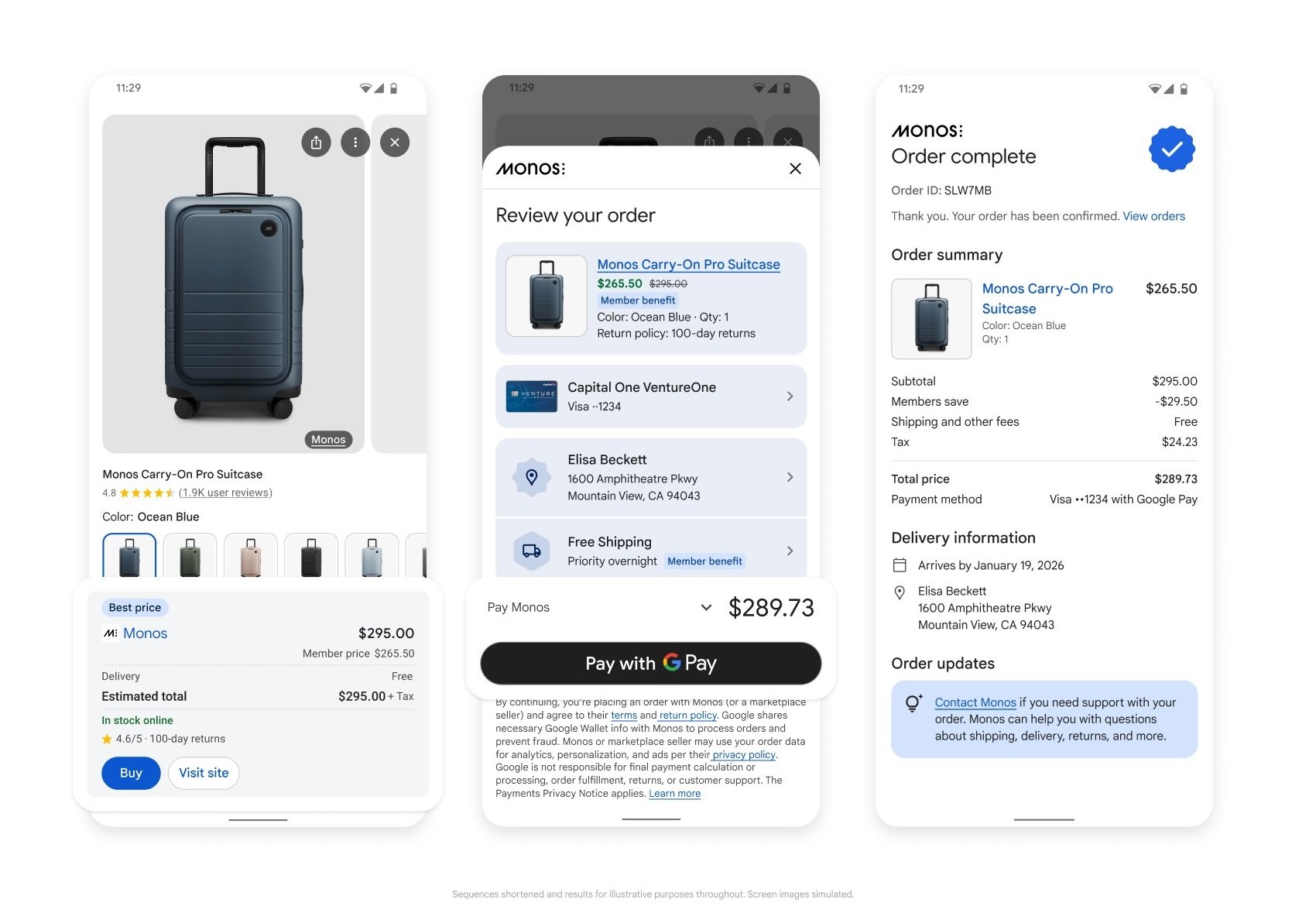
To participate in the Google implementation for UCP, you must have an active Merchant Center account and provide products eligible for checkout. This is to ensure that Google has the necessary product information to surface your inventory to be purchased directly within conversational experiences.
Next steps:
The Universal Commerce Protocol has been co-developed and endorsed by more than 20 partners across the ecosystem, and it’s an open-source project. We invite developers, businesses, and platform architects to join us in building the future of commerce and welcome feedback. You can get involved today by exploring the specification on our GitHub repository, participating in GitHub Discussions and contributing through pull requests.

Reproducing Olmo 3 7B Pre-training in MaxText: case study of large scale training on TPUs

Turn your REST APIs into MCP tools with Google Cloud API Gateway

Accelerating Spatio-Temporal Attention for Video Diffusion on TPUs

Introducing Support for Local AI Models in the Antigravity SDK