As agentic workflows evolve beyond simple text exchanges to rich UIs, developers face a persistent trade-off between deep customization and seamless integration.
Until now, developers often had to choose between two distinct paths:
To address these trade-offs, we are sharing three architectural patterns, with implementation guides and sample code to demonstrate seamless integration of A2UI and MCP Apps. We are considering making a MCP extension to support A2UI, making these patterns easier to adopt. Let us know if you’re interested.
Integrating these two approaches allows developers to leverage native component rendering for standard UI elements, while reserving custom iframe embedding for highly tailored, complex experiences.
Serving A2UI over MCP servers allows developers to add rich, natively rendered UIs to their tools as an alternative to MCP Apps. It pairs the simplicity of widely adopted MCP tool connectivity with native A2UI rendering.
This approach lowers the barrier to entry for developers adopting generative UI. It provides the benefits of dynamic UI without the overhead of building a full Agent-to-Agent (A2A) architecture or dealing with complex discovery mechanisms.
Below is a demo application that is powered by the A2UI-over-MCP architecture. The application consists of 2 panels.The left panel contains a simple form that allows users to select cooking style and protein type, and the right panel displays a recipe card. Users select the cooking style and protein types in the left panel and click on the "Get Recipe" button to fetch a new recipe card to be displayed on the right panel.
Both panels in this app are generated by A2UI, and both leverage the A2UI-over-MCP architecture where A2UI payloads are retrieved directly from an MCP server and directly rendered with the A2UI framework. By leveraging the A2UI framework for rendering the UI, the host application does not have to maintain any UI component logic while maintaining a design consistency by simply applying its own theming to the A2UI components.
Instead of an MCP server returning a standard text response or a bundled HTML/JS web app, for an MCP server to return A2UI payloads, it returns a structured JSON payload with a specific MIME type: application/a2ui+json.
{
  "content": [
    {
      "type": "resource",
      "resource": {
        "uri": "a2ui://dynamic-ui/recipe-card",
        "mimeType": "application/a2ui+json",
        "text": "[
          { "version": "v0.9",
            "createSurface": { ... }
          }
        ]"
      }
    }
  ]
}Developers can leverage two distinct delivery mechanisms for this payload: via MCP Resources (resources/read) or through MCP Tool invocations (tools/call). Regardless of the method, the endpoint utilizes the a2ui:// URI scheme. Upon receipt, an A2UI-capable host environment automatically directs the JSON structure to its native rendering engine for execution.
1.Static Delivery via MCP Resources (resources/read)
For workflows requiring prescriptive interfaces that remain constant regardless of conversation context, developers can serve A2UI payloads as standard MCP Resources. The host application simply retrieves a dedicated URI—for example, a2ui://config-panel—and the server delivers the immutable JSON structure directly.
2.Dynamic Delivery via MCP Tool Calls (tools/call)
To unlock authentic generative UI and live data injection, clients can invoke an MCP Tool. The backend executes logic to retrieve real-time context, allowing the agent to assemble the A2UI layout dynamically. This bespoke payload is then returned as an embedded resource within the CallToolResult.

To see this architecture in action, check out the A2UI-over-MCP Quick Start guide to run A2UIxMCP Recipe Studio Web App shown in the demo above. This interactive demo features a static A2UI surface loaded from an MCP Resource (a recipe selection form) and a dynamic A2UI surface served from an MCP Tool (a custom generated recipe card) running side-by-side.
A frequent point of inquiry among engineering teams is how the A2UI-over-MCP implementation differs from native Agent-to-Agent (A2A) architectures beyond the transport protocol. The distinction lies in the level of dynamism and orchestration complexity:
While engineers typically leverage MCP Tools for deterministic results, these endpoints are not inherently limited to static logic. Although employing a backend LLM is unconventional in standard MCP Tool configurations, developers can orchestrate an agentic layer behind the tool call to serve a more generative UI experience through the A2UI-over-MCP architecture if they choose to do so. However, the context for driving the UI generation will remain limited to the too parameters and the prescribed prompt for the backend agent.
While A2UI over MCP is ideal for native integration, sometimes you need the isolated, highly custom environment of an MCP App. You can achieve this by encapsulating an MCP App within an A2UI component without disrupting the host's native design system or security boundaries. By encapsulating an MCP App within an A2UI component, engineers can delegate complex, state-intensive modules to a secure iframe for highly tailored experiences.
This hybrid methodology empowers engineers with creative flexibility for intricate, state-intensive modules, while ensuring the primary interfaces to remain aligned with native design of the host and maintain robust state synchronization protocols.
Below is a demo application that showcases the MCP App as an A2UI component. The server-side Agent responds with an A2UI payload, in which one of the components is an MCP App component whose input parameter includes the full code of a web-based Pong Game. The A2UI payload also includes 2 score cards that are not part of the MCP App.
When the user starts playing the Pong Game against the CPU, the control of the paddle and the ball position states are governed by the code within the embedded MCP App. Yet, whenever there is a score, this event is relayed to the Agent and the native A2UI components are rehydrated with the updated score allowing state synchronization across all components (native A2UI and MCP App) in the A2UI surface.
To achieve this hybrid approach, developers define a custom A2UI component that acts as a secure iframe wrapper (referred to as MCP App Component). This generalized wrapper can hold any standard MCP App and provides a bridged channel for the app to communicate with the outside world.
Whenever an agent requests, the MCP server transmits the app’s HTML and JavaScript assets to the agent. The agent then embeds the application code within a structured A2UI JSON, integrating it with the specified component parameters. The consolidated JSON is dispatched to the host and the MCP App is rendered within the above iframe wrapper alongside with the other A2UI native components.
The A2UI Rendering Engine maintains the state across both the native components and the embedded MCP Apps using a secure, event-driven cycle, which we refer to as state synchronization. Rather than relying on real-time DOM scraping or state polling, synchronization follows an explicit interception loop:
To see this exact architecture in action, check out our MCP Apps in A2UI Quick Start guide to run a live client. This interactive demo features an AI Agent integrated with an MCP Server that can serve a Calculator App and a Pong Game which can be served in an Angular implementation of a generic MCP App wrapper component.
This pattern serves as a powerful modernization bridge, allowing developers to inject dynamic, agent-driven UIs into legacy applications or non-A2UI environments without requiring a complex architectural overhaul.
In this pattern, the MCP App bundle contains its own A2UI renderer. To fetch the dynamic A2UI interfaces, the MCP App bridges a tool call to the server to retrieve the A2UI payload, leveraging the A2UI-over-MCP mechanics discussed earlier. Once the A2UI JSON payload is received, the MCP App parses and renders them entirely within its own iframe boundary. By absorbing the generative UI complexity into a self-contained renderer, this pattern allows developers to bring dynamic AI-driven interactions to existing systems with minimal to no architectural overhaul.
Below is a demo application that showcases the A2UI embedded MCP App. The host app loads an MCP App that offers an online text-editor retrieved from an MCP Server. This MCP App is packaged together with the A2UI library which provides the capability to render A2UI JSON Payload as UI. By incorporating the A2UI-over-MCP technology discussed in Pattern 1, this MCP App can effectively communicate with the MCP Server to support generative UI features via A2UI protocol.
In this demo, the user kicks off their AI-assisted text-editing by highlighting a portion of the text. When the user highlights the text, the backend server takes the text as an argument to devise contextually relevant parameters for editing the text. These controls are served via A2UI, and the MCP App renders them on receiving this payload. Users can then adjust the parameters to direct the AI on how they want to edit the parts. When the user clicks on "Generate Revision", the AI Agent will take these parameters into account and provide an edit suggestion to the user.
In contrast to the other patterns, this architectural pattern removes the need for native A2UI support within the host environment. By packaging the A2UI rendering engine directly within the MCP App bundle, developers can offload the complexity to the embedded application itself.
By leveraging the App Bridge, the embedded MCP App communicates with a backend AI Agent using the A2UI-over-MCP mechanics from Pattern 1. Any response it receives from the MCP Server containing the MIME type application/a2ui+json is treated as an A2UI Payload and delegated to the A2UI library for rendering.
To achieve the features that are generative in nature, this demo app has an AI Agent sitting behind the MCP Server. This allows the MCP Tool Calls to leverage LLM to produce context-relevant control parameters and text revisions from the provided arguments.
The following interaction lifecycle governs this self-contained loop:
<html>
<body>

  <div>
    <h3>MCP App (Editor Panel)</h3>
    <p>This text is native to the sandboxed third-party app.</p>

    <!-- A2UI Surface custom element provided by the A2UI SDK -->
    <a2ui-surface surfaceId="recipe-card"></a2ui-surface>
  </div>

  <script>
    // Note: The pseudocode below assumes AppBridge from @modelcontextprotocol/ext-apps
    // and a2uiProcessor from the A2UI SDK are preloaded or inlined.
    const bridge = new AppBridge({ name: 'editor-panel', version: '1.0.0' });

    // Helper to extract and process dynamic A2UI responses from tool results
    function processA2UIResponse(result) {
      const a2uiResource = result?.content?.find(
        c => c.type === 'resource' && c.resource?.mimeType === 'application/a2ui+json'
      );
      if (a2uiResource?.resource?.text) {
        const payload = JSON.parse(a2uiResource.resource.text);
        window.a2uiProcessor.processMessages(payload);
      }
    }

    // 1. Initialize AppBridge and fetch initial controls
    async function initApp() {
      await bridge.connect();

      // Call server tool to load initial layout controls
      const result = await bridge.callServerTool({ name: 'fetch_controls', arguments: {} });
      processA2UIResponse(result);
    }

    // 2. Handle interactive User Actions routed by the A2UI SDK
    window.a2uiProcessor.events.subscribe(async (event) => {
      if (!event.message.userAction) return;
      const action = event.message.userAction;

      // Route the user action directly via the bridge to the MCP Server tool
      const result = await bridge.callServerTool({
        name: action.name,
        arguments: action.context
      });

      // Feed any updated server UI states back to the A2UI processor
      processA2UIResponse(result);
    });

    // Initialize the app on startup
    initApp();
  </script>
</body>
</html>To see this exact architecture in action, check out our A2UI in MCP Apps Quick Start guide to run a live client. This interactive demo features the MCP App containing its own A2UI rendering engine to support generative text-editing experience for users.
Combining A2UI and MCP Apps helps your agentic UIs remain secure, capable, and native-feeling without sacrificing creative expressiveness. This unified approach allows you to bypass iframes when rendering UI with tools (A2UI over MCP), display rich custom canvases inside declarative views (MCP Apps in A2UI), and easily drop dynamic UIs into existing web apps (A2UI in MCP Apps).
A2UI is a flexible message format which can be transmitted from any backend to any frontend. That flexibility means there are a lot of options for how you can use it.
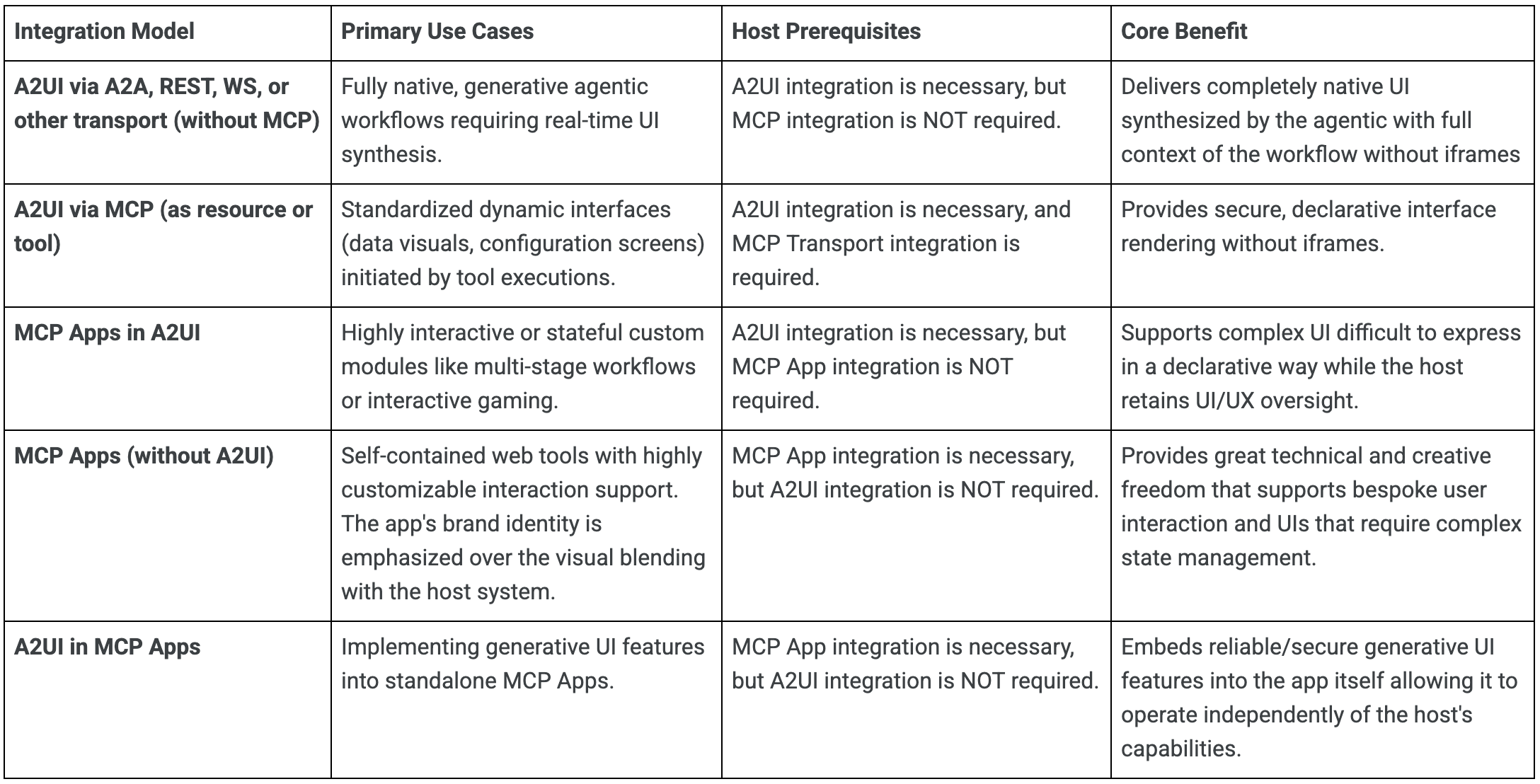
To help you navigate these options, use the decision tree below to find the optimal architecture for your project's specific constraints and requirements:
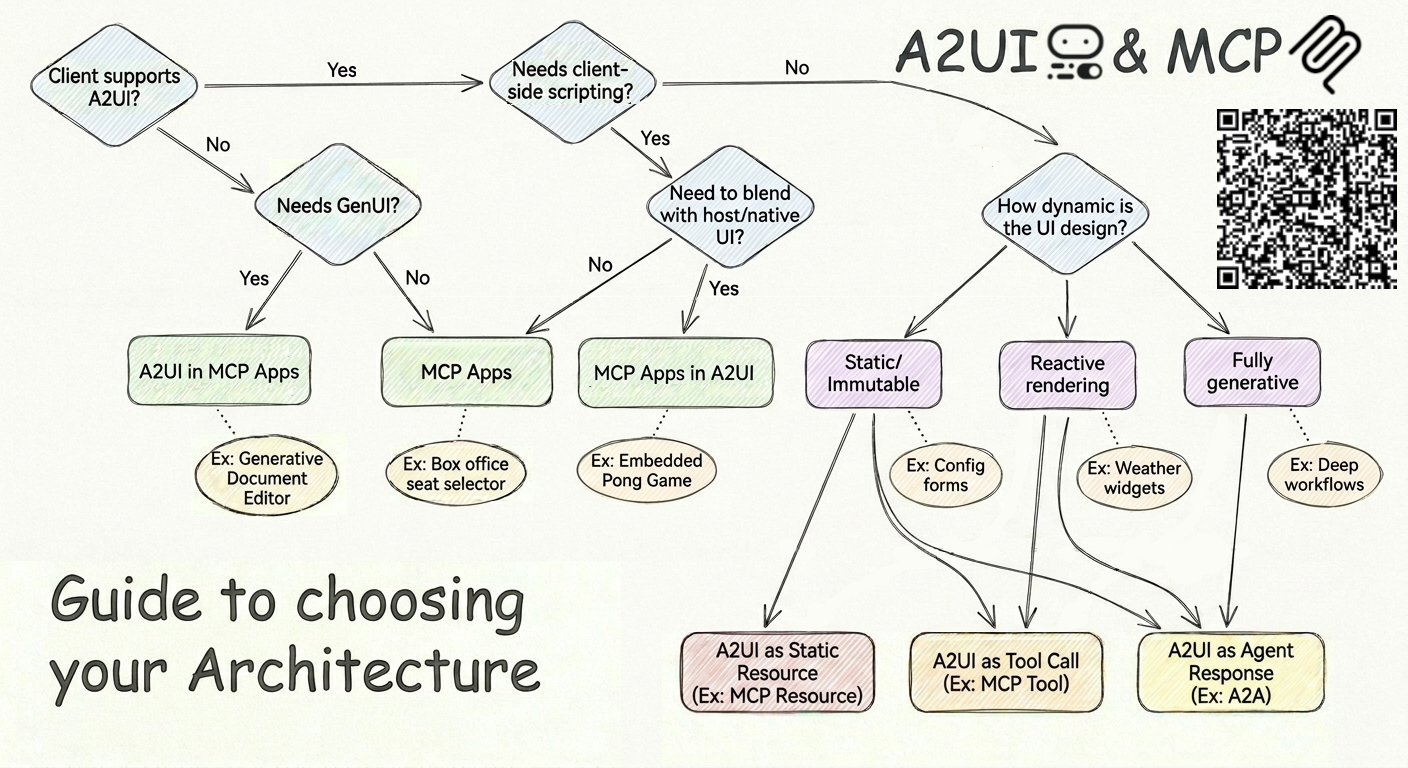
Ready to wire up A2UI and MCP Apps in your own stack?