

Modern search and retrieval augmented generation (RAG) applications increasingly need to work across diverse content types, from technical documentation and source code to images, video clips, and audio recordings. The challenge is finding models that deliver strong retrieval accuracy while maintaining low latency across all these formats without requiring massive compute infrastructure to run and index.
EmbeddingGemma 2 is designed to provide a single, compact open model released under the Apache 2.0 license, delivering exceptional multimodal performance for its size. Based on Gemma 4, this sub-1B model maps text, code, images, video, and audio into a unified 768-dimensional space. Its modular architecture lets you load only what you need, scaling from 270M parameters for text and code up to 740M parameters for all modalities.
Key capabilities include:
EmbeddingGemma 2 replaces chained models with modular encoders that project into a shared 768-dimensional space:
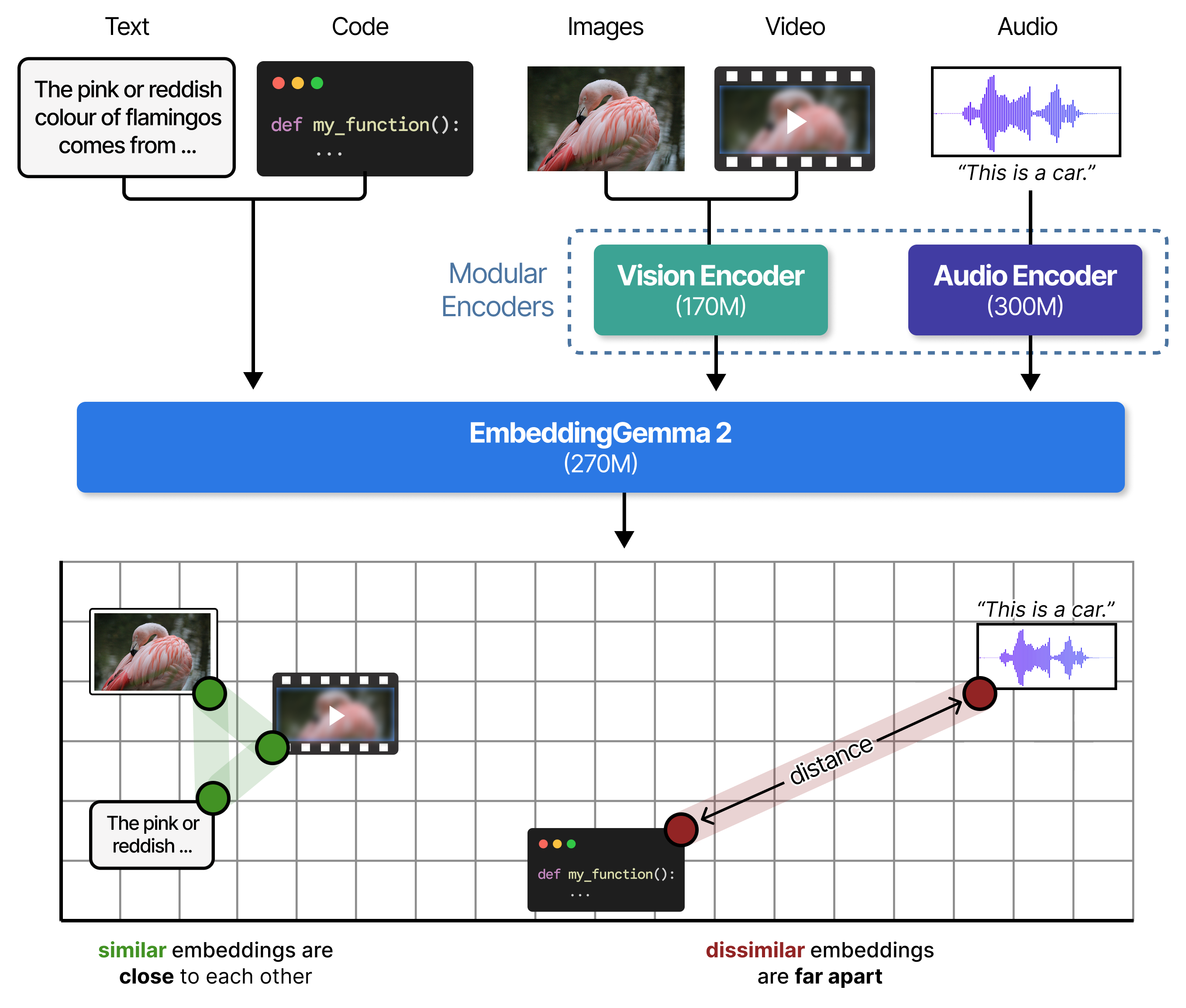
Even though each modality is processed by a specialized encoder, all inputs are processed through the shared backbone and their resulting embeddings occupy the same dimensional space:
You can run EmbeddingGemma 2 across text, code, images, video, and audio with the sentence-transformers library (v6.1.0 or later):
pip install -U sentence-transformers[image,audio,video] transformersThe full model embeds text, code, images, video, and audio:
from sentence_transformers import SentenceTransformer

# Full model: all modalities (740M parameters)
MODEL_ID = "google/embeddinggemma-2"
model = SentenceTransformer(MODEL_ID)To minimize memory usage, you can omit unused modality encoders at load time by setting `vision_config` or `audio_config` to None in config_kwargs. Disabled encoders are never loaded into memory, so the savings apply to both the weights and peak allocation:
# Text only (270M parameters)
text_only_model = SentenceTransformer(
    MODEL_ID,
    config_kwargs={"vision_config": None, "audio_config": None},
)

# Text, images, and video (440M parameters)
text_image_model = SentenceTransformer(
    MODEL_ID,
    config_kwargs={"audio_config": None},
)

# Text and audio (570M parameters)
text_audio_model = SentenceTransformer(
    MODEL_ID,
    config_kwargs={"vision_config": None},
)EmbeddingGemma 2 is trained with short task instructions to steer representations for specific tasks. Set prompt_name in encode() to add it for you:
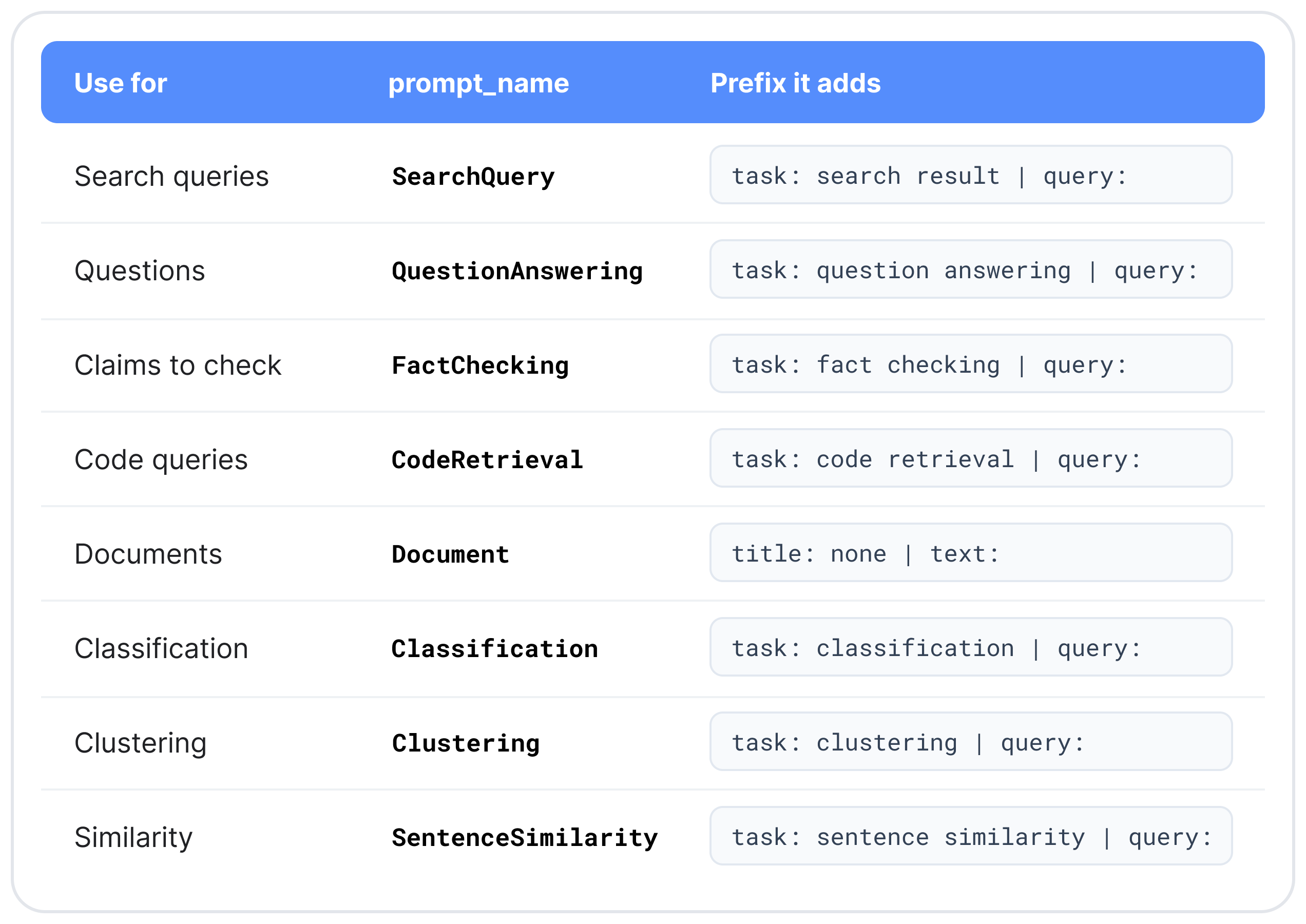
For retrieval, encode queries and documents with different prompts:
query = "What causes the northern lights?"
document = "The northern lights are caused by charged particles from the sun.." # truncated

# Embed using `prompt_name`
query_emb = model.encode(query, prompt_name="SearchQuery")
doc_emb = model.encode(document, prompt_name="Document")

print(model.similarity(query_emb, doc_emb))Pass media as a dictionary keyed by modality without a prompt. To embed text and media together, mark where each item goes with <|image|>, <|video|>, or <|audio|>:
# Cross-modal search: one text query against a photo and a sound recording
image_emb = model.encode({"image": "sunset_beach.jpg"})
audio_emb = model.encode({"audio": "ocean_waves.wav"})
query_emb = model.encode("ocean waves at sunset", prompt_name="SearchQuery")

print(model.similarity(query_emb, image_emb))
print(model.similarity(query_emb, audio_emb))

# Interleaved: one embedding for a product listing with text, photo, and video
listing_emb = model.encode({
    "text": "Waterproof trail shoe. <|image|> Grip test on wet rock: <|video|>",
    "image": "trail_shoe.jpg",
    "video": "grip_test.mp4",
})
query_emb = model.encode("waterproof trail shoes", prompt_name="SearchQuery")

print(model.similarity(query_emb, listing_emb))Despite coming from different modalities, the embeddings generated by EmbeddingGemma 2 occupy the same dimensional space and can be compared on their semantic similarity.
Pass truncate_dim (512, 256, or 128) with normalize_embeddings=True to get shorter, unit-length vectors. Queries and documents must use the same dimension:
# Truncate the query
query_emb = model.encode(
    query,
    prompt_name="SearchQuery",
    truncate_dim=256,
    normalize_embeddings=True,
)To use one dimension for every call, set it at load time instead: SentenceTransformer(MODEL_ID, truncate_dim=256). For instance, in bfloat16 precision, storing a million 768-dimensional vectors takes roughly 1.5 GB of memory, while truncating them to 128 dimensions requires just 250 MB. That 6x reduction allows you to store six times as many embeddings in the same memory budget, making it much easier to fit large indexes in memory or on-device.
In sentence-transformers, all four encoder setups load from the same checkpoint, so they share one vector space: a query embedded with the 270M text-only setup can be matched directly against documents embedded with the full model.
As a general guideline, load only the encoders your data needs, and truncate dimensions only when storage or search speed require it.
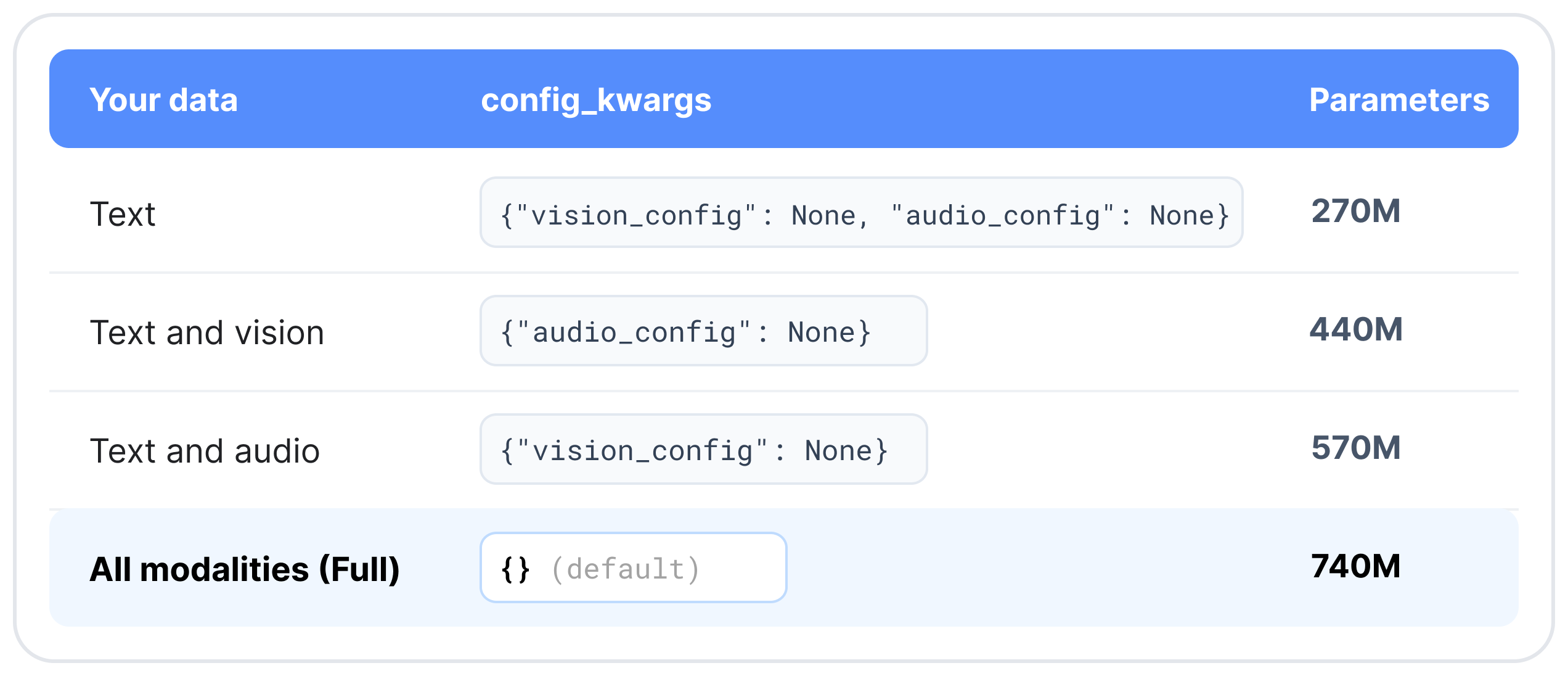
If you start with a text-only index and later add image or audio embeddings, simply reload the model with the additional encoder enabled. Embeddings you have already computed do not need to be re-computed.
All modalities share the 8,192-token context window, at fixed rates:
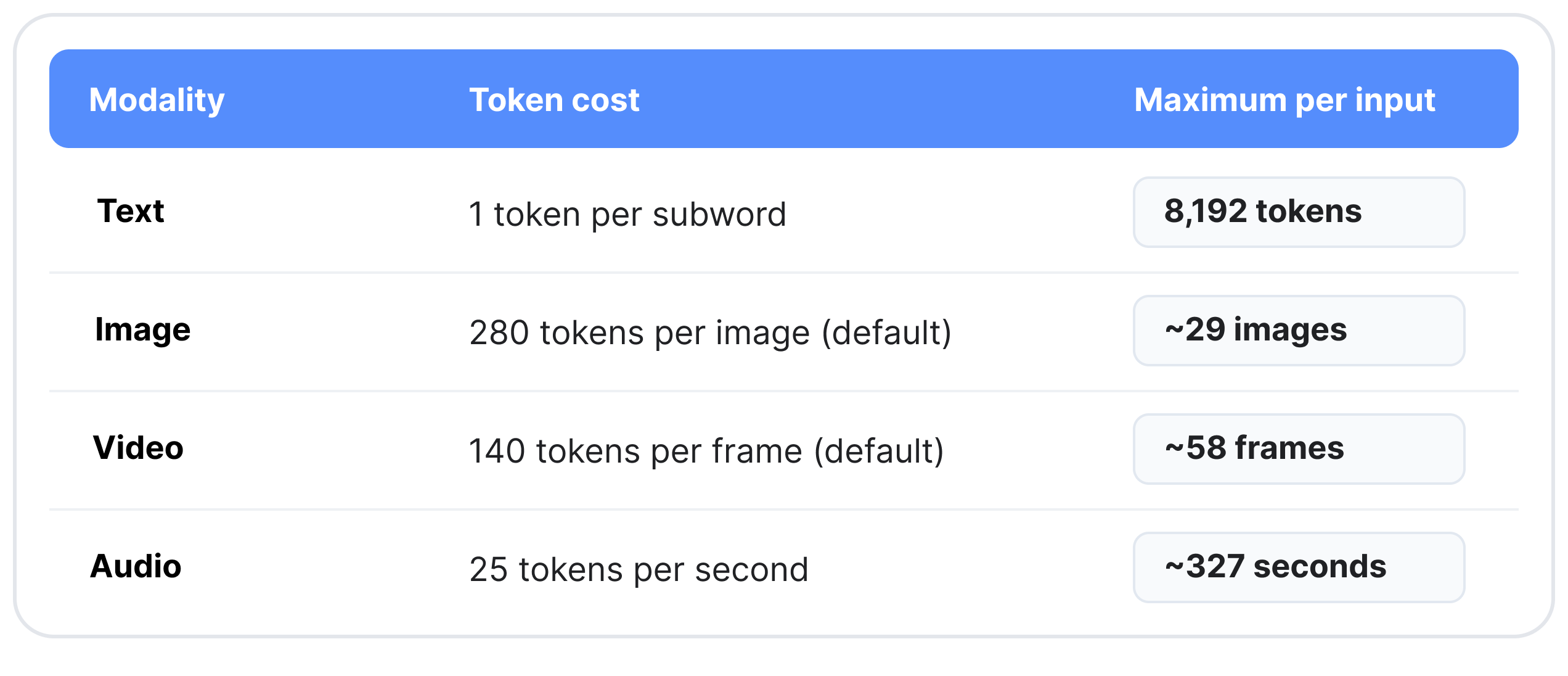
The maximums assume a single modality with no text. Pass media as file paths (MP4 for video), URLs (images and audio), or in-memory PIL images, arrays, and tensors. Video is sampled at 1 frame per second by default, and audio should be 16 kHz mono.
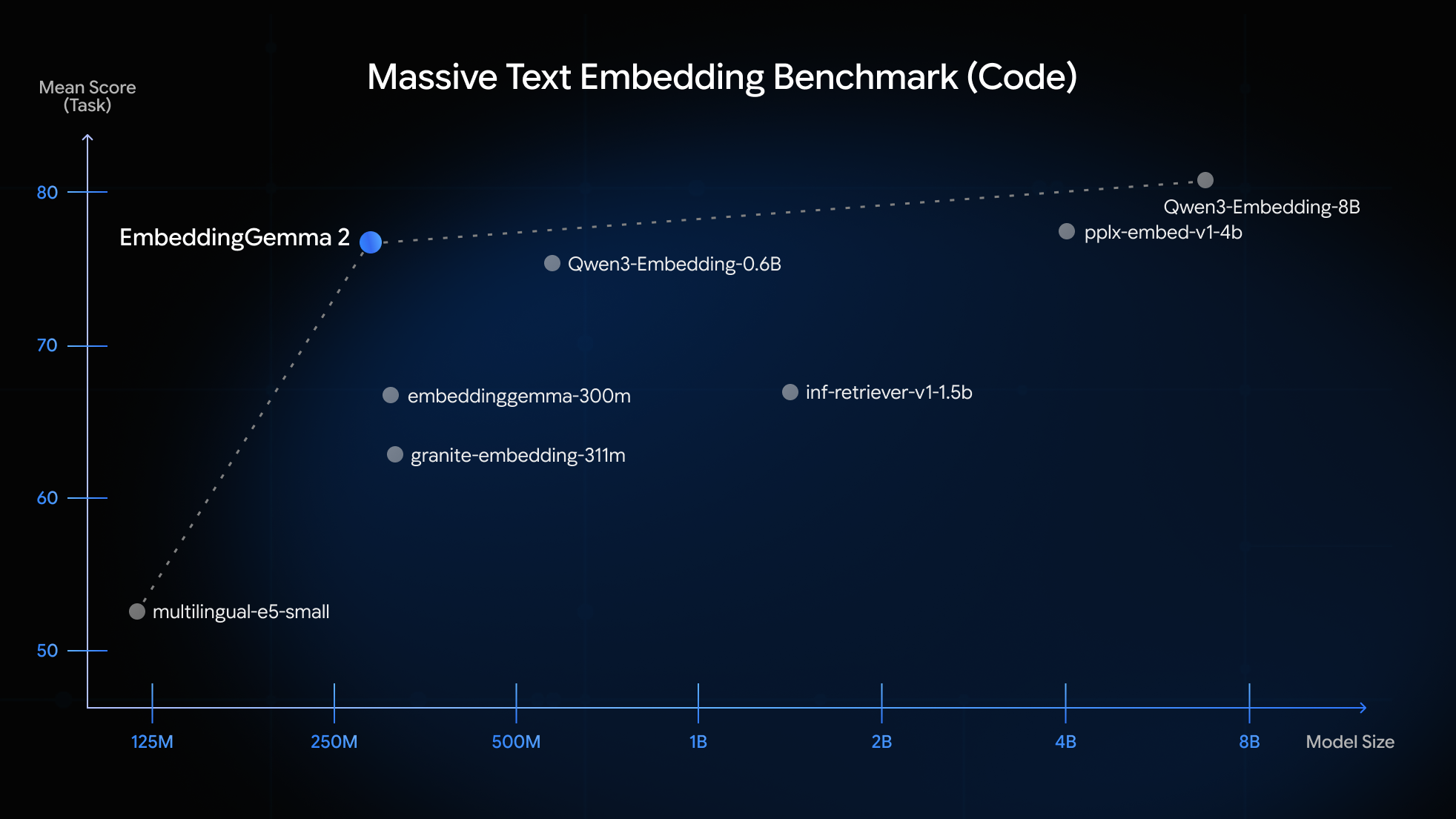
EmbeddingGemma 2 scores 14% higher than EmbeddingGemma 1 on MTEB (Code), adds image, video, and audio retrieval while retaining the accuracy on multilingual text of EmbeddingGemma 1
Ready to explore multimodal embeddings? Take a look at the following resources to find out more:


