

A guide to streaming tools, non-blocking function calls, and response scheduling in the Agent Development Kit (ADK) Gemini Live API Toolkit.
In text chat, a 13-second database query or RAG pipeline shows a loading spinner. In a live voice conversation, 13 seconds of blocking tool execution produces 13 seconds of dead air, causing users to assume the call dropped and hang up.
You cannot always make backend queries sub-second, so the fix must be architectural: keep the agent conversational while slow tools run in the background. Rather than forcing you to wire up custom client-side WebSocket event loops to manage asynchronous tool state, the open-source ADK and gemini-3.8-live let you implement non-blocking voice tools natively in Python. In our benchmark sales-report workflow on gemini-3.8-live, switching from a blocking tool to a streaming tool cut the time to the agent's first words from 14.4 seconds to 1.2 seconds.
This guide covers how to use streaming tools, non-blocking FunctionTool definitions, and response_scheduling to build responsive, natural voice agents.
Watch the 1-minute ADK Live AI Concierge demo video to hear scheduled responses in action:
Implementing non-blocking tool calls in ADK provides several immediate user experience benefits:
In standard agent development, a tool is defined as an async def function that completes its work and returns a single value:
from typing import Any


async def query_sales_database(region: str) -> dict[str, Any]:
    """Runs the quarterly sales report query for a region.


    Args:
      region: Sales region to report on, e.g. "EMEA" or "APAC".


    Returns:
      A dict containing report metrics upon completion.
    """
    report = await run_expensive_query(region)       # e.g., 13 seconds of work
return {"status": "success", "report": report} # Single return at the endWhen passed directly to an Agent in ADK, this function creates a blocking tool call. During a Gemini Live API bidirectional voice session (run_live), the execution loop awaits the tool's return before generating further model turns.
If query_sales_database takes 13 seconds, the agent produces 13 seconds of complete silence. Prompting instructions such as "tell the user you are working on it" cannot resolve this, because the model's turn is blocked waiting for the function response payload.
To keep the conversation fluid, you can choose between two main non-blocking patterns depending on the desired user experience.
When an operation consists of meaningful stages (such as connecting to a database, aggregating records, and formatting results), a streaming tool lets the agent narrate progress as it happens.
In ADK, turning a standard tool into a streaming tool requires changing only return to yield. By defining the function as an AsyncGenerator, ADK automatically marks the tool declaration as NON_BLOCKING and returns an immediate status acknowledgement to the model.
import asyncio
from typing import AsyncGenerator
from google.adk.agents import Agent


async def query_sales_database(region: str) -> AsyncGenerator[str, None]:
    """Runs the quarterly sales report. Call this ONCE; it pushes updates automatically.


    Args:
      region: Sales region to report on, e.g. "EMEA" or "APAC".


    Yields:
      Progress updates while the query runs, followed by the final summary.
    """
    stages = [
        ("Connecting to the sales warehouse...", 1.5),
        ("Scanning order records...", 3.5),
        ("Aggregating revenue by product line...", 3.5),
        ("Formatting the report...", 1.5),
    ]
    for message, delay in stages:
        yield f"PROGRESS: {message}"
        await asyncio.sleep(delay)


    yield f"DONE: {region} Q2 revenue reached $4.81M, up 12.4% year over year."


agent = Agent(
    name="sales_analyst",
    model="gemini-3.8-live",
    tools=[query_sales_database],
    instruction=(
        "You are a helpful sales assistant. When the user asks about sales data, "
        "call query_sales_database once. Acknowledge the request immediately, "
        "briefly paraphrase each progress update, and present the final figures "
        "when completed. Keep answers conversational and concise."
    ),
)query_sales_database, ADK immediately dispatches an asynchronous status event to the model. The agent speaks right away ("Looking into the EMEA figures for you now...").yield sends a partial function response upstream. The model paraphrases each update as it arrives ("Connecting to the warehouse...", "Aggregating product line data..."), though narration can trail the tool by several seconds.stop_streaming(function_name: str) in the agent's tools list, ADK intercepts the call and cancels the generator's underlying asyncio.Task, raising asyncio.CancelledError within your function so you can cleanly close database connections or file handles.interrupted=True so your client can stop audio playback. Running streaming or background tools are not cancelled, and their results are still delivered. To stop a tool, the model must call stop_streaming.Continuous progress commentary is not always appropriate. If a user asks for a report and immediately pivots to another topic, an agent that continually interrupts with status updates can feel intrusive.
When the wait has no story to narrate, run the task quietly in the background.
An effective way to get an immediate verbal acknowledgment without ongoing progress chatter is an async generator that yields only once, upon completion:
async def query_sales_database(region: str) -> AsyncGenerator[dict, None]:
    """Runs the quarterly sales report. Call this ONCE; results arrive when ready."""
    report = await run_expensive_query(region)   # Background execution (~13s)
yield report # Single yield upon completionBecause this is an async generator, ADK issues an immediate pending response. The agent promptly acknowledges the request ("I'm pulling that report together for you now"), remains silent during computation, and presents the figures once ready or when the user finishes speaking.
If you prefer to keep standard coroutines (async def ... -> dict), wrap the function in a FunctionTool and configure response_scheduling:
from google.adk.tools import FunctionTool
from google.genai import types


sales_tool = FunctionTool(query_sales_database)
sales_tool.response_scheduling = types.FunctionResponseScheduling.WHEN_IDLE
(Note: In ADK 2.10+, you can also set `sales_tool.behavior = types.Behavior.NON_BLOCKING` to run a tool in the background without modifying scheduling mode.)Understanding the Trade-Off: When using response_scheduling with a return-once coroutine, the model receives no payload until the entire function completes. As a result, the model typically does not utter an initial verbal acknowledgment unless the user continues speaking. This pattern is ideal when the user immediately continues with other questions and you want the result woven into the dialogue at the next natural pause.
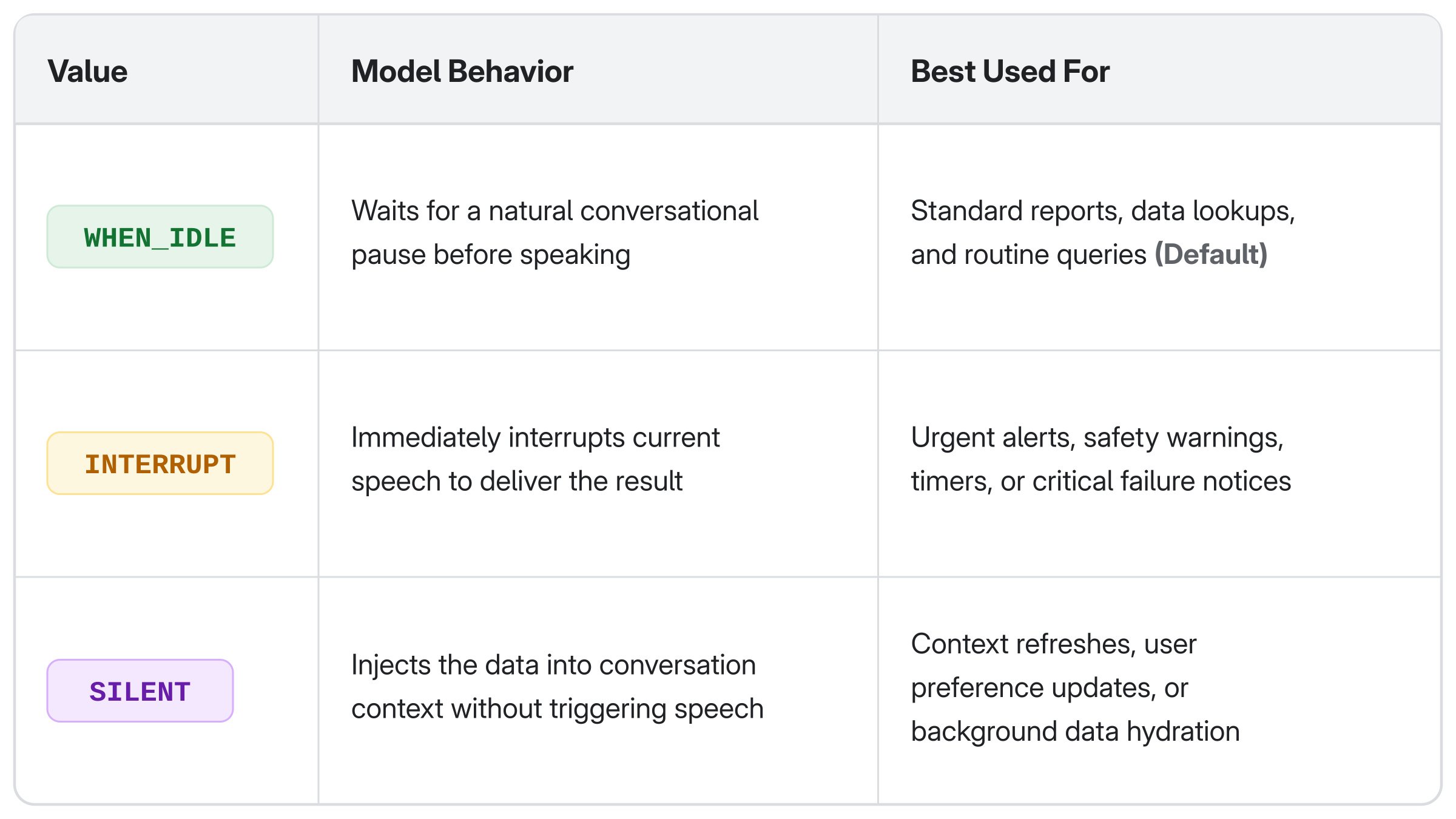
The response_scheduling attribute controls when the model reacts to an incoming tool response. WHEN_IDLE never cuts into a turn in progress: if the model is still speaking or the user is still talking, the result waits until that turn ends, and the model responds at the next natural pause. ADK supports three scheduling behaviors:
In benchmark sessions with gemini-3.8-live:
WHEN_IDLE, an incoming sales report waited politely while the model finished answering a separate 20-second question, then delivered the figures seamlessly.INTERRUPT, the incoming result cut off current speech mid-sentence; the model then finished its answer and appended the figures.SILENT, the result was added to the conversation history, available for subsequent turns without prompting an unrequested announcement.Execution shape (streaming vs. single-return) and delivery timing (response_scheduling) are independent and can be composed. Setting response_scheduling on a streaming tool stamps every partial update with that behavior.
Furthermore, in ADK 2.8 and newer, streaming tools can dynamically specify scheduling per update by yielding types.FunctionResponse:
# Acknowledge and keep intermediate progress quiet:
yield types.FunctionResponse(
    response={"stage": "aggregating"},
    scheduling=types.FunctionResponseScheduling.SILENT,
)


# Deliver the final result when the speaker finishes:
yield types.FunctionResponse(
    response={"report": final_data},
    scheduling=types.FunctionResponseScheduling.WHEN_IDLE,
)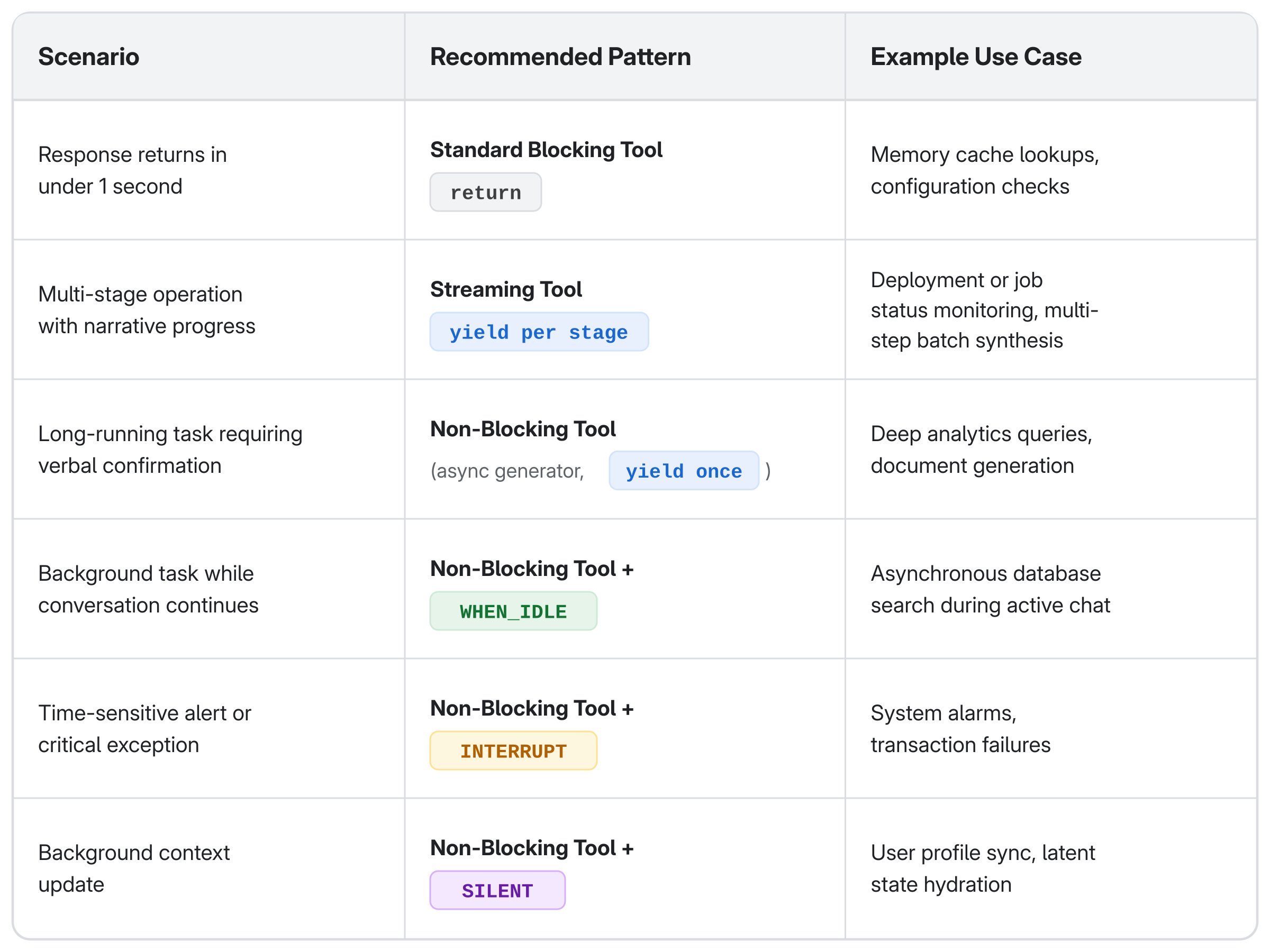
The rule of thumb: If the wait has a story, stream it. If the wait is just a wait, run it in the background and let the result land when idle.
Non-blocking tools do not reduce backend execution time: a 13-second query still takes 13 seconds. What changes is the conversational presence of your agent.
A web application that takes ten seconds to load is perceived as slow; a conversational voice agent that goes silent for ten seconds is perceived as broken. By pairing ADK's streaming tools and flexible response scheduling with the real-time capabilities of gemini-3.8-live, you can build voice assistants that remain attentive, natural, and present throughout complex operations.
Try it yourself: the interactive demo runs the same 13-second query through every tool pattern and response_scheduling mode on gemini-3.8-live, so you can hear the difference.
google-adk >= 2.10.0gemini-3.8-live on Gemini Enterpriserun_live).
Three layers, one repo: a tour of google/adk-recipes

Reproducing Olmo 3 7B Pre-training in MaxText: case study of large scale training on TPUs

Evaluating AI agents: moving past the vibe check

Announcing DPoP Support for Google OAuth: Securing Refresh Tokens